
Appearance
Mapping & Workflows
The configurable layer that fires after raw extraction. Match extracted values against your reference tables, fill in derived fields, drive dropdowns, route approvals. The rule engine is what most customers spend their time tuning.
This section is in five sub-sections — Concepts, Entities, Definitions, Workflows, and Recipes. The concepts are the shared vocabulary; the others get progressively more practical.
The three-layer model
Recognito's rule engine is three layers, with a strict dependency direction:
Workflows  ──invoke──►  Definitions  ──read──►  Entities
   │                        │                       │
trigger + chain lookup spec pure data| Layer | What it is | Where to configure |
|---|---|---|
| Entity | A user-defined table — columns and rows. Pure data, no behavior. | Settings → Mapping → Entities & Definitions |
| Definition | A reusable lookup rule that lives inside one entity. Says "match by these columns, write to these fields." | On its entity's row, via + Definition |
| Workflow | An ordered chain of definition invocations plus a trigger. | Settings → Mapping → Workflows |
Workflows invoke definitions. Definitions read entities. Workflows do not invoke other workflows — only their own trigger event fires them.
Settings → Mapping opens on the entity list, which is where the first two layers live side by side.
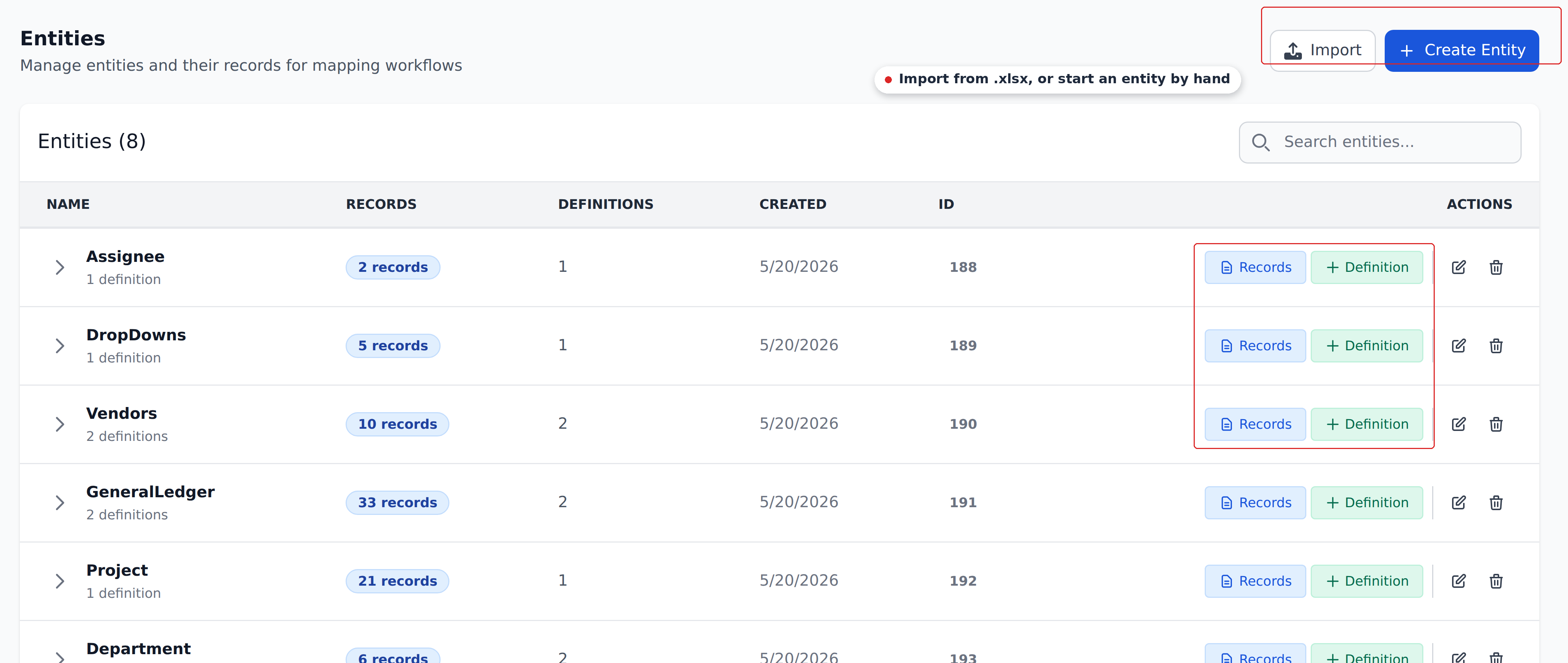
Each row tells you how much data the entity holds and how many lookups are built on it. The Records button opens the rows; + Definition builds a new lookup against them.
Where each sub-section takes you
- Concepts — the shared concepts. Matching types, cascade behavior, fallbacks, async settling, the empty-cell rule. Read first if you're new.
- Entities — creating tables, adding columns, uploading records, managing data.
- Definitions — Mapping vs Dropdown types, Context columns, Mapped columns, Dropdown columns, fallback records.
- Workflows — triggers, step ordering, the
Initial_Workflow, cascade rules. - Recipes — worked customer patterns for common scenarios.
Start with the right page
If you've never configured Mapping before, walk these in order:
- Concepts overview — the five-minute mental model.
- The empty-cell rule — one short page; matters everywhere.
- Matching types — the operators on Context columns.
- Entities overview — what a table looks like.
- Definitions overview — what a lookup rule looks like.
- Workflows overview — putting it all together.
- Recipes — a few worked examples to ground the theory.
If you're already comfortable with the engine, jump directly to the area you're working in.
What the engine does (and doesn't do)
The engine does:
- Match extracted fields against your reference tables.
- Write looked-up values back to document fields.
- Drive dropdown options based on context.
- Route approvals by computed conditions.
- Cascade lookups inside a workflow (one step's writes feed the next step).
The engine doesn't:
- Trigger one workflow from another's writes. Workflows fire only on their own configured trigger.
- Take inline comparison operators or
IF/ boolean expressions typed into column values. Range comparison is set per column via its Matching Type (Less Than, More Than, and so on) — so "if total is between 10,000 and 50,000" lives inside a single definition, not in typed operators. - Overwrite document fields from empty entity cells. Empty cells in your reference table never overwrite document data.
- Support OR logic or field-to-field comparison. A definition matches with pure AND across its Context columns; branching across separate lookups lives at the workflow level.
These constraints shape how customers compose configurations. Knowing the boundaries up front saves rework.
What's next
- Concepts — the shared concepts. Start here.
- Recipes — worked examples if you learn better from concrete cases.
- How Recognito works — back to the mental-model overview.