
Appearance
Cascade rules
Workflows don't trigger other workflows. A step writing to a Select-type field updates that field's value but does not fire the workflow watching it. This is the single most consequential rule for workflow design.
This page explains the rule, why it exists, and the design pattern that works around it.
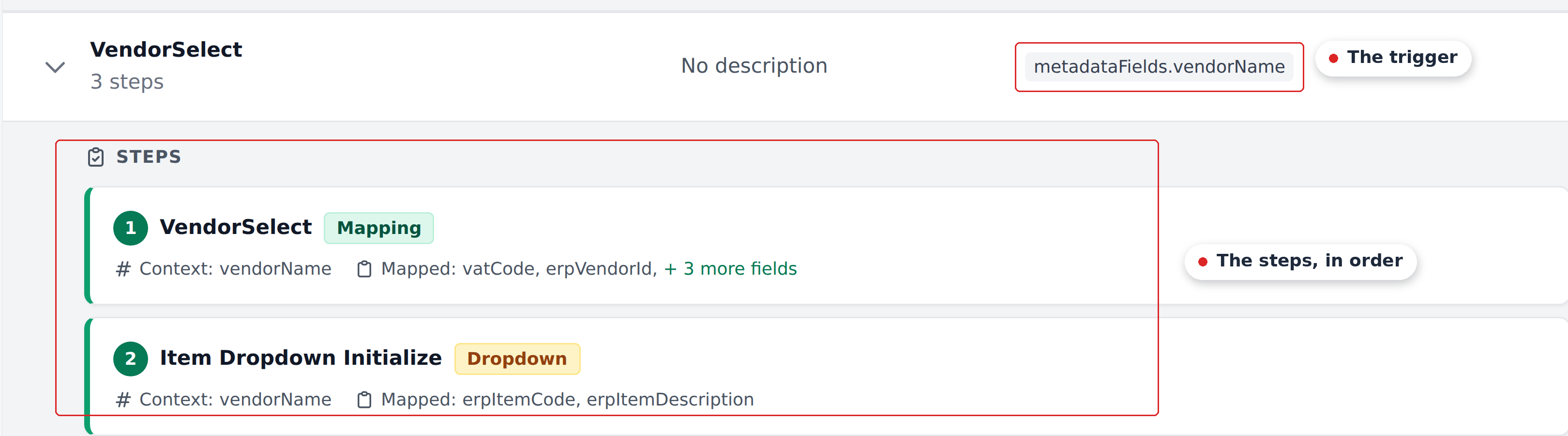
The workaround is visible in that screenshot: three lookups that another product might chain as three workflows are composed as three steps of one.
The rule
A workflow fires only on its own configured trigger:
Initial_Workflowfires on Document Analysed (when extraction finishes).- User-driven workflows fire on On field select — when a reviewer interacts with the trigger field.
- The system-shipped
Approversworkflow fires on a hidden internal trigger (not part of the self-serve product today — talk to your account manager).
Programmatic writes from other workflows don't count as trigger events. If Vendor Select's step 3 writes itemDescription, the workflow watching itemDescription does not fire.
A concrete example
Imagine a project with two workflows:
Vendor Select— trigger:metadataFields.vendorName. Step 2 writesitemDescription.Header Product Select— trigger:metadataFields.itemDescription. Steps fire when itemDescription changes.
A reviewer picks a new vendor. What happens:
Vendor Selectfires (its trigger isvendorName, which the reviewer just changed).- Step 1 writes vendor metadata.
- Step 2 writes
itemDescription(programmatically — based on lookup). Header Product Selectdoes NOT fire. Even though its trigger field changed.- The cascade ends after Vendor Select's last step.
If the customer assumed Header Product Select would chain off step 2's write, they end up with a half-populated document.
Why the rule exists
The rule prevents:
- Infinite loops. Workflow A writes a field watched by Workflow B; Workflow B writes a field watched by Workflow A. Without the no-cross-cascade rule, this would loop forever.
- Implicit ordering. Reasoning about which workflow ran in what order is hard when any write can trigger anything. The explicit-trigger-only model makes the firing order deterministic.
- Surprising firing. A programmatic write firing a workflow can produce side effects the customer didn't intend. Restricting to user actions keeps the model predictable.
The trade-off is that customers can't compose workflows in the "fire one to trigger the next" sense. They compose within one workflow instead.
The design pattern
Since workflows don't chain, customers inline everything they need into one workflow.
The Vendor Select workflow in a typical multi-tenant project has these 5 steps:
- Vendor Select (Mapping) — write vendor metadata.
- Initialize Products (Dropdown) — rebuild item dropdowns.
- Add Accountant and Warehouse on Select (Mapping) — write accountant and warehouse.
- Item Product Dropdown Initialize — per-row item dropdowns.
- Item Product Mapping (Mapping) — per-row erpItemCode.
All five effects of picking a vendor live in one workflow. Even though there's a separate Header Product Select workflow watching itemDescription, the customer doesn't rely on chaining — they inline the equivalent step (step 5) directly.
The result: every effect of the trigger is a step in the trigger's workflow. Nothing relies on side-effects firing other workflows.
The mirror-the-Initial_Workflow pattern
User-driven workflows often re-run a subset of Initial_Workflow's steps when the trigger field changes.
If Customer Initials Select fires (because the reviewer changed customerInitials), it re-runs:
- Approvers (new customer might have different approvers).
- Initialize Products (new customer has different catalogs).
- Item Product Dropdown Initialize.
- Item Product Mapping.
- Add Accountant and Warehouse.
That's 5 of Initial_Workflow's 12 steps — picked because they all depend (directly or transitively) on customerInitials. The customer essentially says "re-run the chunks of Initial_Workflow that this field change affects."
The work: identify which Initial_Workflow steps depend on the trigger field, then mirror them in the user-driven workflow.
Gotchas
Forgetting a step
Any Initial_Workflow step the customer forgets to mirror in the user-driven workflow goes stale when the trigger field changes. The reviewer ends up with some fields updated and others stale.
Example: Initial_Workflow has 12 steps. Customer Initials Select mirrors 5. The other 7 won't fire when customerInitials changes — fields they populated stay at their old values.
The recourse: manually re-pick those fields' triggers (e.g., re-pick vendorName to fire Vendor Select), or use Reset Data on each affected field to re-run Initial_Workflow for that single field.
Expecting a step write to fire another workflow
The most common confusion. Two workflows where one writes to a field the other watches. The customer assumes the chain. It doesn't happen.
Concrete diagnostic: if you see fields that should have updated but didn't after a cascade, check whether you're expecting cross-workflow chaining. If yes, the fix is to inline the relevant definition as a step in the firing workflow.
Order matters even within a single workflow
The no-cross-cascade rule plays alongside the within-workflow sequential feed-through. Inside one workflow, steps see each other's writes; across workflows, they don't.
This makes step ordering inside a workflow load-bearing. See Steps and ordering for the full treatment.
The dead-workflow trap
Workflows showing No triggers that aren't Initial_Workflow (or a Recognito-configured Approvers workflow) are dead — they never fire. The UI doesn't warn you.
Periodically scan your project's workflows for these and clean up. See Triggers for the full treatment.
When you really need workflow chaining
If you find yourself wanting workflow A to trigger workflow B, the practical alternatives:
- Inline the work. Put the steps from B as steps in A. Simple, works.
- Restructure entities. Sometimes the desire for chaining means the entities aren't shaped right. A single richer lookup might do what two chained workflows were trying to do.
- Accept the limitation. Some chains genuinely can't be expressed today. The recourse is reviewer-driven (the reviewer manually clicks the field that fires the second workflow).
There's no escape hatch for cross-workflow chaining today. Design around it.
What's next
- Cascade behavior — the conceptual treatment.
- Steps and ordering — the within-workflow sequential rule.
- Triggers — what fires each workflow.
- Recipes — worked examples that work with (not against) the cascade rule.