
Appearance
Serving multiple companies from one project
A common need for groups of companies: one Recognito project handling invoices for several subsidiaries without per-subsidiary project duplication. The pattern is discrimination by a tag column. One entity hosts data for every subsidiary; a discriminator column narrows lookups to the right subsidiary.
This is the most-mature use of the rule engine. Read the simpler recipes first if you haven't.
Teaches: composite-key matching with pure AND, the discriminator pattern, multi-tenancy without per-tenant duplication.
The discriminator is just another Context field, added first so the composite key evaluates it first.
The scenario
The Acme group has four subsidiaries:
- Acme USA
- Acme UK
- Acme Germany
- Acme Lithuania
Each has its own vendor master, GL chart, approver list, and ERP integration. The CFO wants one Recognito project handling AP for all of them, because:
- Separate projects per subsidiary mean separate configurations to maintain.
- Adding a fifth subsidiary should be cheap, not a project-creation exercise.
- The reviewers handle invoices from any subsidiary; they shouldn't need to switch projects.
The catch: every lookup needs to be narrowed to the right subsidiary. An Acme USA invoice shouldn't pull up Acme Germany's vendors.
Step 1 — Pick a discriminator
The discriminator is the column that tags each entity row with its subsidiary. Common values:
- A short code:
US,UK,DE,LT. - The subsidiary's customer ID in the parent company's master:
100,200,300,400. - The subsidiary's legal-entity name.
For this recipe, use 2-letter codes: customerInitials is the discriminator column, values US, UK, DE, LT.
Step 2 — Set up the Customer Initials entity
This entity maps an extracted identifier from the document to the customerInitials code.
Entity name: Customer Initials
Columns:
CustomerId— the value the engine extracts from the document (e.g., the customer's company registration number).customerInitials— the short code.
Rows:
| CustomerId | customerInitials |
|---|---|
| 100-USA-CORP | US |
| 200-UK-LTD | UK |
| 300-DE-GMBH | DE |
| 400-LT-UAB | LT |
The exact CustomerId values are whatever appears on incoming documents. The mapping function is "translate the document's identifier into our internal short code."
Step 3 — Create the discriminator definition
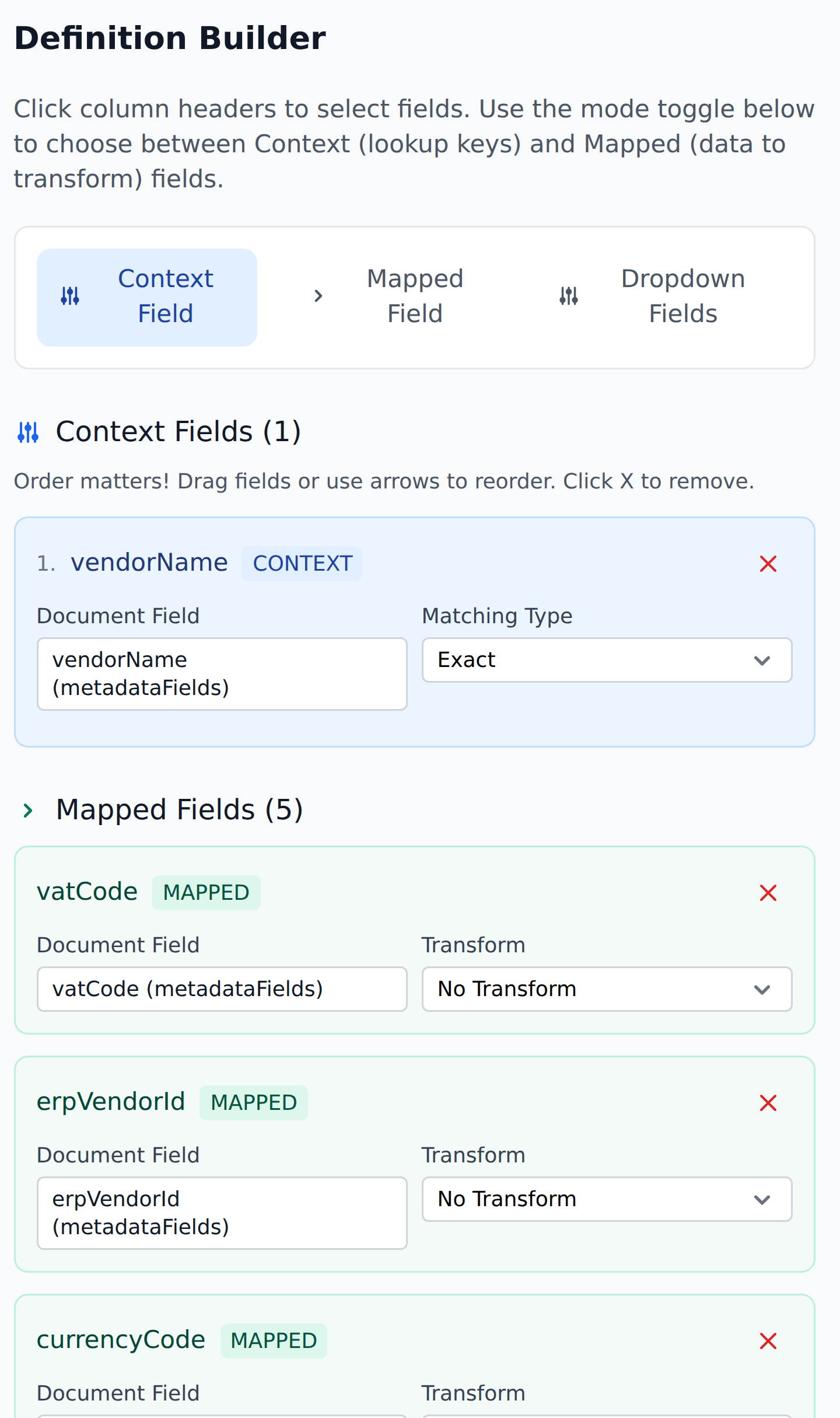
Inside Customer Initials, create a Mapping Definition:
Definition Name:   Initialize Customer Initials
Type:              Mapping Definition
Target entity:     Customer Initials

Context columns:
  1. CustomerId       Matching Type: Exact

Mapped columns:
  - customerInitials (metadataFields)   Transform: No Transform
When a document arrives, this definition reads the extracted CustomerId and writes the matching customerInitials code to a Metadata field.
Step 4 — Set up shared entities with the discriminator column
Every entity that holds subsidiary-specific data needs a customerInitials column.
Vendors
| customerInitials | vendorId | vendorName | vendorAccount | currency |
|---|---|---|---|---|
| US | V-100 | Acme USA Supplier A | 10-USA-001 | USD |
| US | V-101 | Acme USA Supplier B | 10-USA-002 | USD |
| UK | V-200 | Acme UK Supplier A | 10-UK-001 | GBP |
| UK | V-201 | Acme UK Supplier B | 10-UK-002 | GBP |
| DE | V-300 | Acme DE Supplier A | 10-DE-001 | EUR |
| LT | V-400 | Acme LT Supplier A | 10-LT-001 | EUR |
All four subsidiaries' vendors are in one Vendors entity, distinguished by customerInitials.
GL Accounts, Approver Routing, Departments
Same pattern for every entity that holds subsidiary-specific reference data. Each entity gets a customerInitials column; rows mix across subsidiaries.
Step 5 — Update every definition's Context
The first Context column on every definition becomes customerInitials. The remaining Context columns are the previous narrowing logic.
For the Vendor lookup definition:
Definition Name:   Initialize Vendors
Type:              Mapping Definition
Target entity:     Vendors

Context columns:
  1. customerInitials   Matching Type: Exact
  2. vendorId           Matching Type: Exact

Mapped columns:
  - vendorName (metadataFields)     Transform: No Transform
  - vendorAccount (metadataFields)  Transform: No Transform
  - currency (metadataFields)       Transform: No Transform
The composite AND (customerInitials=US, vendorId=V-100) matches one specific vendor row. The lookup narrows correctly.
Do the same for every other definition. Each one gets customerInitials as its first Context column.
Step 6 — Update the Initial Workflow
Initial_Workflow's first step needs to be the discriminator-setting one:
| # | Step | Purpose |
|---|---|---|
| 1 | Initialize Customer Initials | Sets customerInitials from extracted CustomerId |
| 2 | Initialize Vendors | Vendor lookup narrowed by discriminator |
| 3 | GL Lookup | GL narrowed by discriminator |
| 4 | Approver Routing | Approver routing narrowed by discriminator |
| 5+ | … | All other steps |
The discriminator must be set first. The sequential feed-through means subsequent steps see the freshly-written customerInitials value and use it in their Context lookups.
If you put step 1 anywhere else, all the downstream steps run with customerInitials=(empty) and silently no-op.
Step 7 — Test
Upload a sample Acme USA invoice. The extraction produces:
CustomerId=100-USA-CORPvendorId=V-101
Initial_Workflow runs:
- Step 1:
customerInitials=US - Step 2: matches Vendors row
(US, V-101)→ writesAcme USA Supplier B,10-USA-002,USD. - Subsequent steps narrow by
USand produce US-specific results.
Upload an Acme Germany invoice with CustomerId=300-DE-GMBH. The cascade narrows everything to DE. Same workflow, different subsidiary, different data.
Adding a new subsidiary
When Acme acquires a fifth company (say Acme France, FR):
- Add a row to Customer Initials:
(CustomerId=500-FR-SAS, customerInitials=FR). - Add Vendors entity rows: all of Acme France's vendors, with
customerInitials=FR. - Add GL Accounts entity rows: Acme France's GL chart, with
customerInitials=FR. - Add Approver Routing entity rows: Acme France's approvers, with
customerInitials=FR. - Done. No new definitions, no new workflows.
The discriminator pattern absorbs the new subsidiary into the existing setup.
Trade-offs
The pattern is powerful but has cost:
- Every Context grows by one column. Lookups have to AND against the discriminator first. A bit more work per lookup; not noticeable in practice.
- Entities mix data across subsidiaries. Privacy-sensitive subsidiaries may resist seeing each other's data in the same table. If this matters, the alternative is separate projects (with the duplication cost).
- The discriminator definition must run first. Forgetting this breaks every downstream step. Strong convention required.
- Reviewers see invoices from any subsidiary. Permission scoping is via Personal Visibility (the reviewer sees only their assigned documents), but the entity data leaks across subsidiaries via Custom Filter dropdowns (see Users & permissions).
For most multi-subsidiary cases, the trade-offs are worth it. For ultra-sensitive separation, separate projects remain the right call.
What this teaches
- One project can serve N subsidiaries with a discriminator column.
- The discriminator must be the first Context column on every definition.
- Initialize Customer Initials (or its equivalent) must run first in Initial_Workflow.
- Adding subsidiaries is incremental — rows, not configuration. This is what makes the pattern scale.
The pattern generalizes to any multi-tenant scenario: per-customer pricing tables, per-region tax rules, per-department workflows. The shape is the same — add the discriminator column, narrow every Context.
What's next
- Adding a new vendor mid-review — the simpler recipe.
- Routing approvals by invoice total — the conditional-routing recipe.
- Entities overview — the broader entity reference.
- Cascade behavior — why the discriminator step needs to be first.