
Appearance
Integrations
Once a document is
Approved, the data leaves Recognito through one or more outbound channels. Webhooks for real-time push, the Make.com and n8n nodes for low-code automation, file exports for manual handoff, and the REST API for pull-style access.
This page is the orientation. Each channel has its own page with the specifics.
Settings → Integrations is the catalogue: everything Recognito can connect to from inside the product, with its current state on the right.
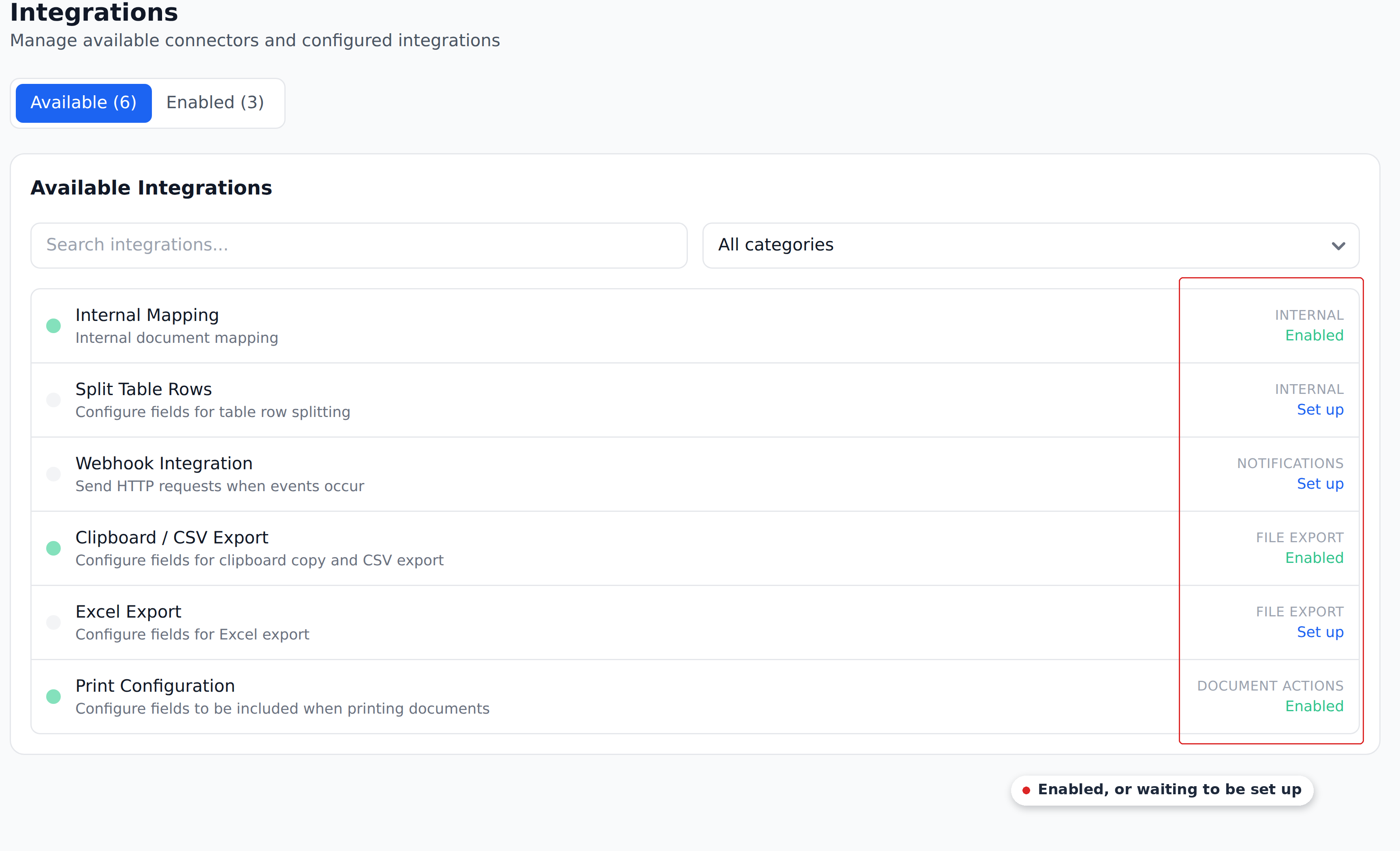
Cards marked Enabled are live; Set up means the connector exists but nothing is configured yet. Clicking either opens that connector's own configuration.
Two of the six are worth calling out because they aren't outbound at all. Internal Mapping is what wires your project's Initial_Workflow to the Document Analysed event — leave it alone unless you know what you're changing. Split Table Rows configures line-item row splitting.
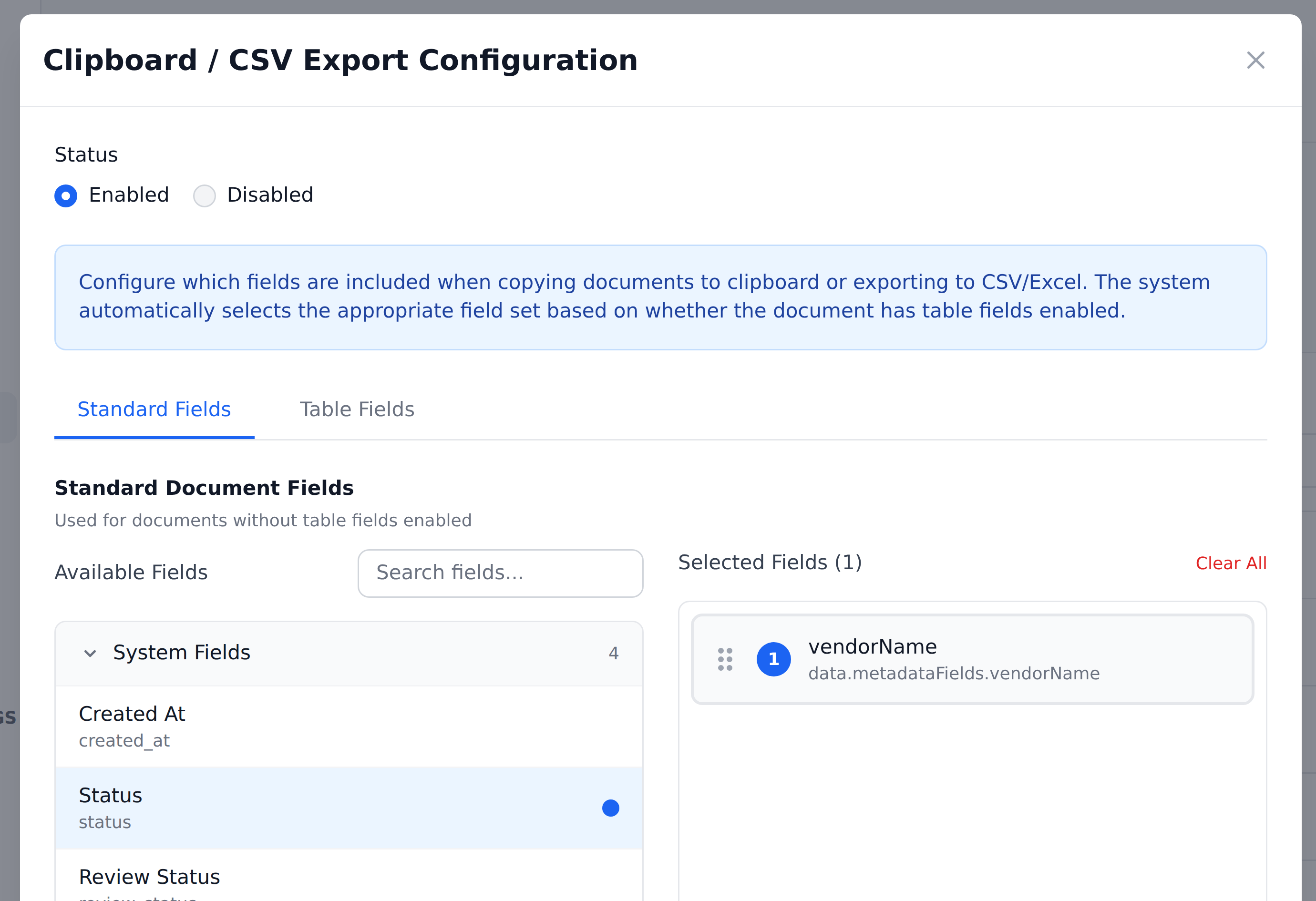
The export cards each carry their own field list, so what lands in a clipboard copy, an Excel file, or a printout is configured here rather than centrally.
What's in this section
- Webhooks — HTTPS POST to your endpoint. The most flexible outbound channel. Fires on one configurable trigger event, and can include the source file.
- Make.com — the Recognito-built Make node lives on Make's app store. Configured inside Make, not in Recognito's Settings.
- n8n — the Recognito-built n8n node lives on n8n's nodes catalog. Configured inside n8n.
- Connecting to your ERP — how to land extracted data in Business Central, Dynamics, NetSuite, or any other system.
- Cloud storage — how to land the source PDF in Google Drive, Dropbox, SharePoint, or OneDrive.
Picking the right channel
Three questions narrow the choice.
Do you want push or pull?
- Push (Recognito sends data when something happens) → webhook, the Make.com node, or the n8n node.
- Pull (your system polls Recognito on its own schedule) → REST API. See the API Reference for the endpoints.
How much code do you want to write?
- You have a developer → webhook. Point it at an endpoint you control, reshape the payload with the Custom Response Schema, and do whatever you need on receipt.
- You'd rather not write code → the Make.com or n8n node. Low-code pipelines glue Recognito to hundreds of downstream systems, including ERPs and cloud storage, without a custom receiver.
Do you need the source PDF, the data, or both?
- Just the data → any channel. The JSON payload carries the extracted fields.
- The PDF too → enable the source-file option on the webhook, then route it wherever you need (your own receiver, or a Make/n8n storage node). See Cloud storage.
What every channel shares
- They fire after
Approved(or sooner, depending on the configured trigger). Document Status flips toExportedonce delivery succeeds. - The payload shape is governed by the Custom Response Schema (Settings → Developers). The same JSON shape goes to webhooks, the Make/n8n nodes, and the Custom Get API — you configure it once.
- Retries happen on failure. Webhooks retry on 1 / 5 / 10 minute intervals before marking failed.
- Where delivery status shows up isn't documented. The document History tracks document changes and approver actions, not integration deliveries — there's no confirmed in-product view of what was delivered or retried.
What the channels don't do
- They don't transform data. The Custom Response Schema does — channels just deliver the JSON. Reshape it before sending, not after.
- They don't re-fire automatically. A failed webhook eventually marks failed; there's no "replay all failed deliveries" affordance today.
- A single webhook fires to one URL, on one event. For multi-destination or multi-event delivery, use a low-code orchestrator (Make.com, n8n) as the fan-out point.
Need a managed connector built for you?
The channels above are self-serve. If you'd rather Recognito's team build and host a dedicated connector for your system, that's available as an engagement — talk to your account manager.
What's next
- Webhooks — start here for the most common outbound channel.
- Make.com — for low-code orchestration on Make.com.
- n8n — for low-code orchestration on n8n.
- Connecting to your ERP — the patterns for landing data in an ERP.
- API Reference — for pull-style integrations and developer reference.