
Appearance
Mapping vs Dropdown definitions
Every definition is one of two types. Both can write values to document fields; the real difference is how dropdowns behave. Mapping Definitions surface unfiltered dropdowns; Dropdown Definitions surface context-filtered dropdowns.
The names are slightly misleading — both types can do mapping. The distinction matters most when a definition is driving a dropdown field.
You pick the type at the top of the definition editor, next to its name.
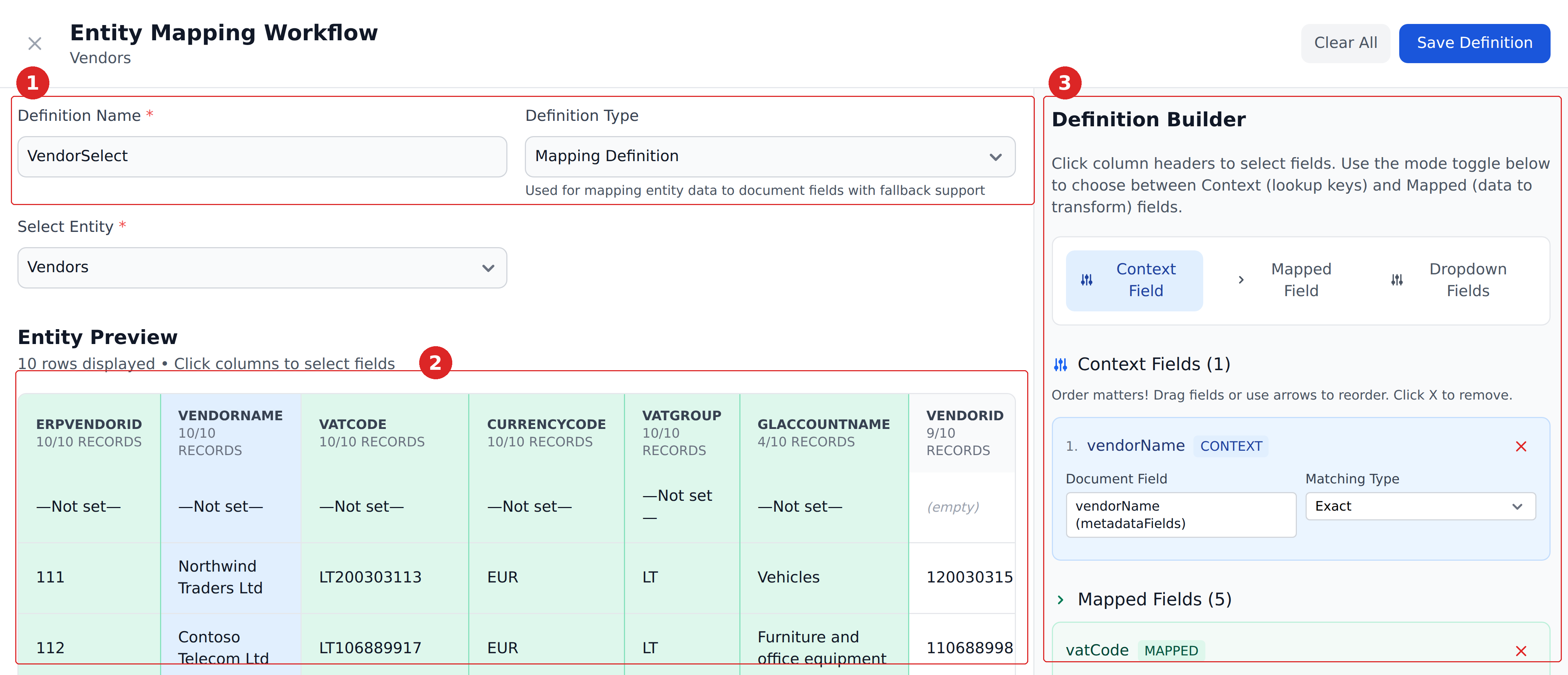
Mapping Definition
The most common type. Use when you want to push values from a reference table into the document.
A Mapping Definition:
- Has Context columns. Lookup is by AND-match.
- Has Mapped columns. When a row matches, the top row's values for these columns write to the corresponding document fields.
- Can have Dropdown columns. The dropdown built from these columns is unfiltered — it lists every value across the entire entity for that column, regardless of the Context.
Example use cases:
- Vendor lookup. Match by
VendorId; writevendorName,vendorAccount,currency, etc. - GL code lookup. Match by
glCode; writeglName,glCategory. - Approver routing. Match by total amount range; write
approvers_N_Mfields.
The dominant pattern for "look up in reference table, push values to document."
Dropdown Definition
Use when you want a dropdown that's narrowed by some other field's value — only show the activities for the currently-selected department, only show items this vendor sells.
A Dropdown Definition:
- Has Context columns. Lookup is by AND-match.
- Has no Mapped columns (the writing happens via Dropdown columns instead).
- Has Dropdown columns. The dropdown built from these columns is context-filtered — it lists only the values from rows that match the Context.
Example use cases:
- Department → activities dropdown. Context column
departmentName; Dropdown columnactivityName. The activities dropdown shows only activities for the currently-selected department. - Vendor → item descriptions dropdown. Context columns
(customerInitials, vendorAccount); Dropdown columnitemDescription. The dropdown narrows to items for this specific customer-vendor pair. - Project → cost centers dropdown. Context column
projectName; Dropdown columncostCenter. Only cost centers belonging to the selected project appear.
The dominant pattern for "narrow this dropdown based on what else has been selected."
What both types do
Both write values to document fields:
- For Mapping Definitions, writes happen via Mapped columns.
- For Dropdown Definitions, writes happen via Dropdown columns (the top matching row's value writes to the field, just like Mapping; what's distinctive is that the options of the dropdown are also rebuilt).
The empty-cell rule applies to both: empty cells in the matched row don't overwrite document fields.
Comparing the dropdown behaviors
The clearest way to see the difference:
| Scenario | Mapping Definition with Dropdown column | Dropdown Definition |
|---|---|---|
Department Finance is selected | Activity dropdown shows all activities across all departments (Finance + Engineering + Sales + ...) | Activity dropdown shows only Finance activities |
Vendor switches to Acme Supplies UK | itemDescription dropdown shows all itemDescriptions across all vendors | itemDescription dropdown shows only items for Acme Supplies UK |
| Project changes | Cost center dropdown shows all cost centers | Cost center dropdown shows only cost centers in this project |
If you want the second behavior, you need a Dropdown Definition.
Picking the right type
The decision tree:
- Pushing values without driving a dropdown? Mapping Definition. (Use Mapped columns; leave Dropdown columns empty.)
- Driving a dropdown that should show every option, regardless of context? Mapping Definition with Dropdown columns.
- Driving a dropdown that should narrow based on context? Dropdown Definition.
- Mix of both? Two definitions — one Mapping for the value pushes, one Dropdown for the narrowed dropdown.
A common confusion
A definition can have both Mapped columns and Dropdown columns. People sometimes assume:
- "Mapped columns mean Mapping Definition." Not quite — both types can have Dropdown columns; only Mapping Definitions can have Mapped columns.
- "Dropdown columns mean Dropdown Definition." Not quite — both types can have Dropdown columns; the difference is filtering behavior.
The cleaner mental model: the type sets the dropdown filtering behavior; the columns decide what's pushed and what dropdowns get built.
When you'd use both
A common pattern: a Header Products entity hosts both:
- A Dropdown Definition that drives the
itemDescriptiondropdown, narrowed by(customerInitials, vendorAccount). - A Mapping Definition that pushes the matched item's
erpItemCode,warehouse, etc. when a specific item gets selected.
Both definitions live in the same entity, use the same columns for Context, but serve different roles. The Dropdown Definition narrows the option list; the Mapping Definition handles the writes once a specific row is locked in.
What's next
- Context columns — the lookup key, common to both types.
- Mapped columns — Mapping-Definition-only writes.
- Dropdown columns — present in both types, with different filtering behavior.
- Fallback records — what happens on no-match.