
Appearance
Context columns
Context columns define what a definition matches on. Each Context column pairs an entity column with a Matching Type. Multiple Context columns combine with pure AND — every column's comparison must succeed for a row to match.
This page covers how Context columns work in practice. For the operators themselves, see Matching types.
What a Context column is
Each Context column has two pieces:
- An entity column reference. Which column in the entity to look at.
- A Matching Type. How to compare that column against the document field's value.
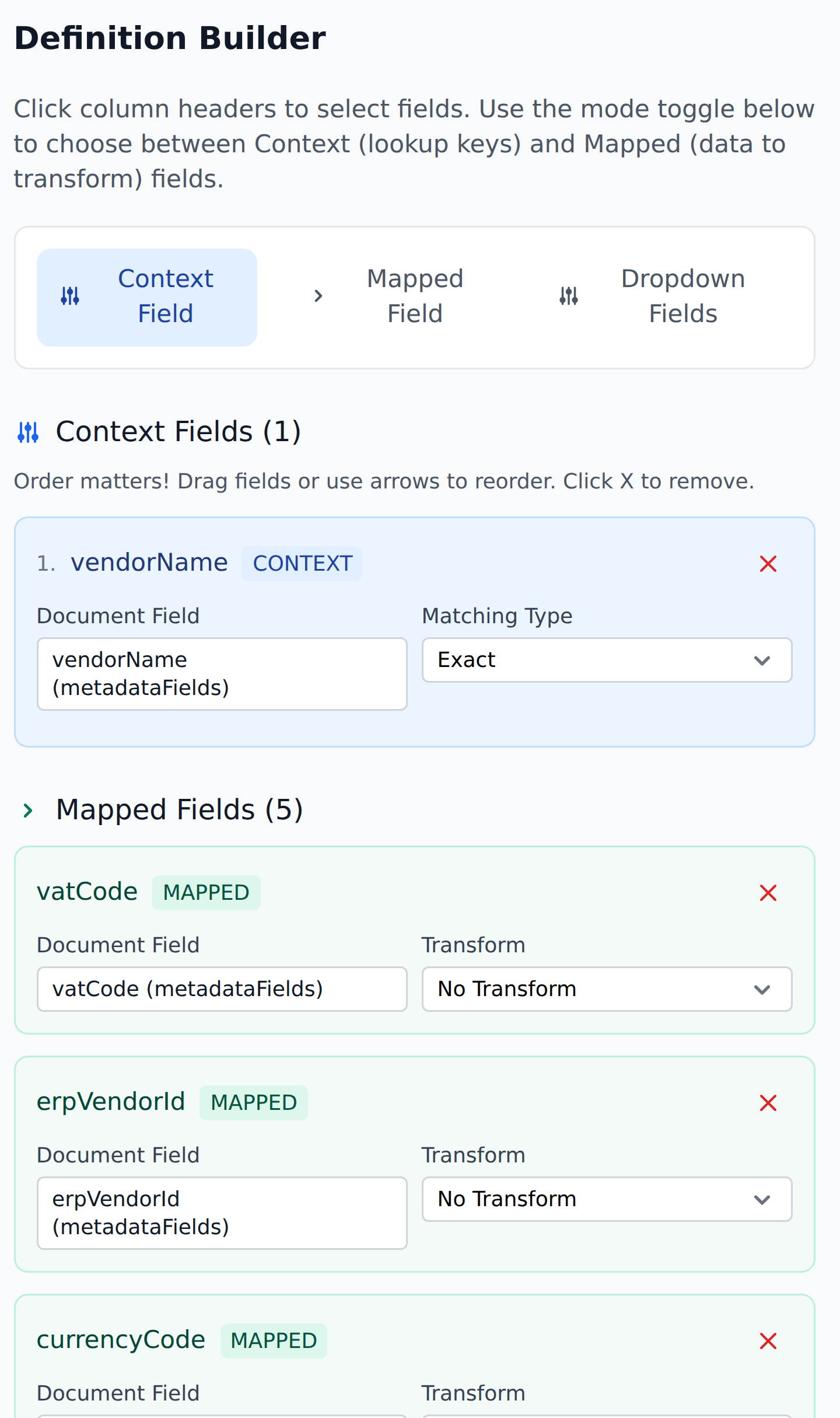
To add one, set the mode toggle to Context Field and click the column's header in the entity preview.
The order field on each Context column controls the order in which columns are listed. It doesn't affect AND semantics — every column has to match regardless of order — but it affects readability and (in the case of multi-level Fallback Records) which column is "first."
Single-column Context
The simplest case. One Context column, typically with Exact matching:
Context columns:
  1. VendorId         Matching Type: Exact
Looks up entity rows where VendorId exactly equals the document's VendorId. One row matches (assuming the entity has unique VendorIds); definition does its writes.
Use single-column Context for simple ID-based lookups.
Multi-column Context (composite key)
Two or more Context columns combine with pure AND:
Context columns:
  1. customerInitials   Matching Type: Exact
  2. vendorAccount      Matching Type: Exact
A row matches only when:
customerInitials(entity) Exactly equalscustomerInitials(document), ANDvendorAccount(entity) Exactly equalsvendorAccount(document).
If either column doesn't match, the row doesn't match. There's no OR, no "match either," no fallback within the column-level decision.
Use multi-column Context for cross-tabulation lookups — per-customer-per-vendor product catalogs, per-department-per-activity dropdowns, per-project-per-cost-center lookups.
Range-routing Context
Range-matching uses two Matching Types on two columns:
Context columns:
  1. SubTotalFrom       Matching Type: More Than or Equal
  2. SubTotalTo         Matching Type: Less Than or Equal
Combined with an entity whose rows define ranges:
| SubTotalFrom | SubTotalTo | approvers_1_1 |
|---|---|---|
| -99999999 | 500 | manager@acmecorp.com |
| 500 | 10000 | director@acmecorp.com |
| 10000 | 999999999 | vp@acmecorp.com |
Lookup of "SubTotal = 247.15" finds row 1 (because 247.15 ≥ -99999999 AND 247.15 ≤ 500).
See Matching types for the full range-routing pattern.
Mixed Context
You can mix Matching Types across columns:
Context columns:
  1. customerInitials   Matching Type: Exact
  2. creditLimit        Matching Type: More Than
  3. region             Matching Type: Exact
Each column applies its own Matching Type; the AND composes them. The example narrows to a specific customer (customerInitials), whose credit limit is below the document's value (creditLimit), in a specific region.
Context vs document field types
Context columns compare entity values against document field values. The document field type matters:
- Text fields — string compare for Exact, lexicographic for ranges. Be careful with numeric values stored as text ("100" < "20" lexicographically).
- Numeric fields — numeric compare for ranges. Range matching is the typical use case.
- Select fields — string compare on the selected value.
- Date fields — date compare for ranges, with the usual care around format consistency.
For numeric range routing, make sure both the entity values and the document field's value are formatted consistently. A 1,234.56 in the entity won't match a 1234.56 document field via numeric comparison.
What the Context references
The Context column reference is to the entity column. The document field that the Context value comes from is implicit — typically the document field whose category matches the workflow's purpose.
In practice, the workflow's behavior makes the document-side reference clear:
- The
Initialize Vendorsdefinition's Context columnVendorIdreads the document'sVendorIdMain field. - The
Header Products Selectdefinition's Context columncustomerInitialsreads the document'scustomerInitialsMetadata field.
The system knows the document-side mapping from the field's name and category. If you change the entity column's reference but the document field's name stays the same, the binding still works.
Adding Context columns
Editing a definition, the Context columns section has:
- A list of currently-configured Context columns.
- Add Context column — appends a new entry. Pick the entity column and the Matching Type.
- Move up / Move down arrows — reorder columns.
- Delete — remove a Context column.
Reordering doesn't change AND semantics. It does change which column is "first" for multi-level Fallback Records.
How many Context columns
The decision rule:
- One column — when the entity column uniquely identifies the row (an ID, a code).
- Two columns — common for cross-tabulation (
customer × vendor,department × activity). - Three columns — common for per-line-item lookups in discriminator-pattern projects (
customer × vendor × product). - Four or more — unusual; consider whether the entity should be reshaped.
More columns = narrower matches = fewer false positives but more chance of silent no-ops. Pick the minimum that gets unique enough matches.
Common patterns
| Pattern | Context shape |
|---|---|
| Direct ID lookup | One column, Exact |
| Range routing | Two columns, range Matching Types |
| Per-customer-per-vendor | Two columns, both Exact |
| Per-line-item product mapping | Three columns: (customer, vendor, product), all Exact |
| Discriminator-pattern lookup | First column is the discriminator (Exact); other columns add specificity |
What's next
- Mapped columns — what writes when a row matches.
- Dropdown columns — what populates dropdowns.
- Matching types — the operators in depth.
- Fallback records — what to do when nothing matches.