
Appearance
Routing approvals by invoice total
A common policy: small invoices get approved by one person, mid-size invoices need a manager, large invoices need a VP. This recipe sets up the workflow that routes by total. Teaches range matching, conditional logic at the workflow level, and the
approvers_N_Mconvention.
Teaches: Matching Types (Less Than / More Than), multi-rule workflows, conditionality at workflow level, the approvers_N_M field convention.
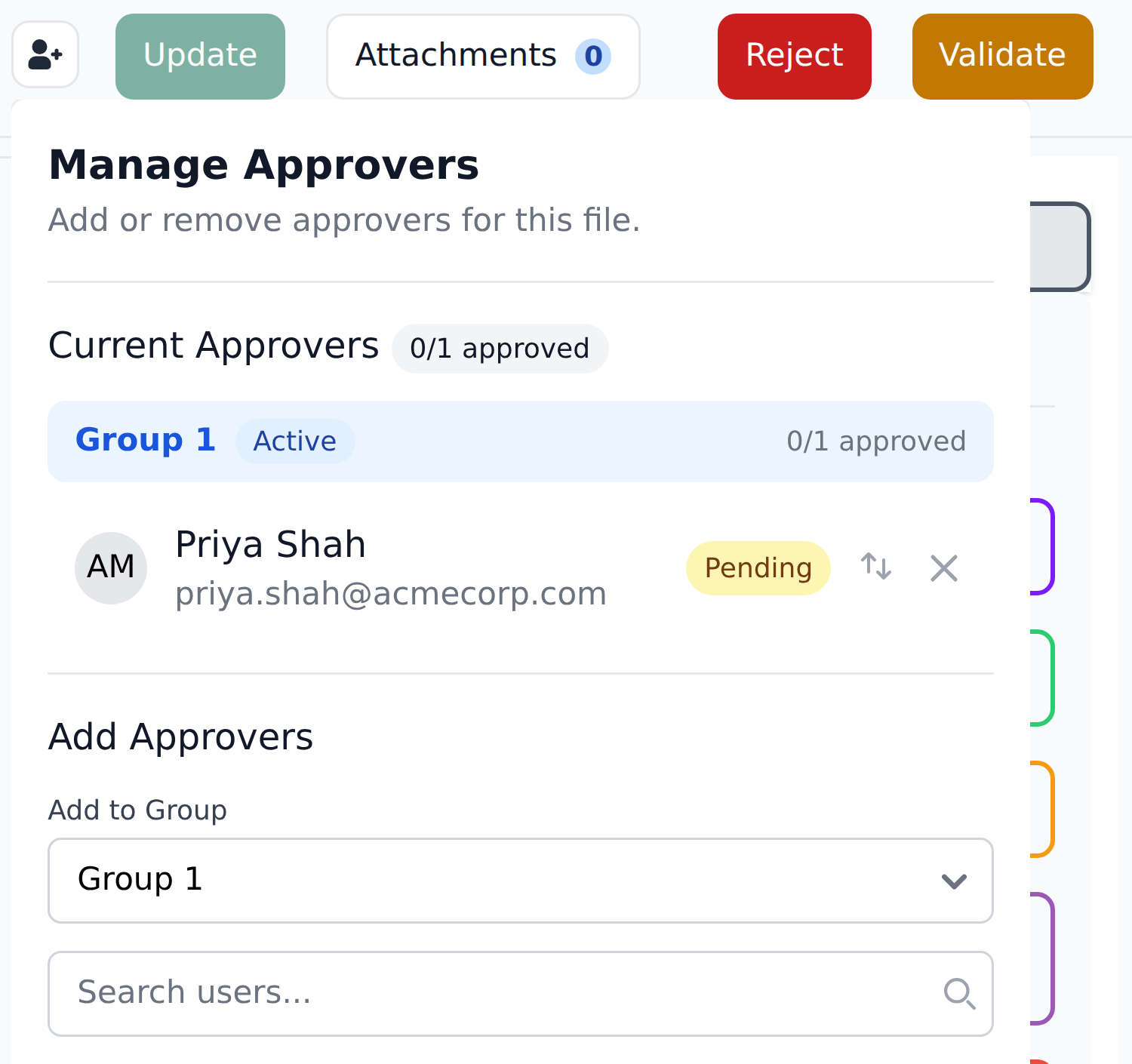
The result shows up for reviewers in the approvers panel on each document — which group is live, and who in it still has to sign.
The scenario
Acme Corp's policy:
- Invoices under €500 — approved by the assignee directly (no extra approver).
- €500 to under €10,000 — approved by a department manager.
- €10,000 to under €50,000 — approved by both a department manager and a director.
- €50,000 and above — approved by manager, director, and a VP.
The routing should happen automatically at extraction time based on the document's total. This recipe sets it up.
Step 1 — Design the entity
Create an entity called Approver Routing with these columns:
SubTotalFrom— lower bound of the range (inclusive).SubTotalTo— upper bound of the range (exclusive).approvers_1_1— first approver of Group 1 (manager).approvers_2_1— first approver of Group 2 (director).approvers_3_1— first approver of Group 3 (VP).
The approvers_N_M naming follows Recognito's convention: N is the group number, M is the slot within that group. approvers_1_1 means "Group 1, slot 1." Most groups have one slot; you can add approvers_1_2 if Group 1 needs multiple approvers.
Populate the entity:
| SubTotalFrom | SubTotalTo | approvers_1_1 | approvers_2_1 | approvers_3_1 |
|---|---|---|---|---|
| 0 | 500 | (empty) | (empty) | (empty) |
| 500 | 10000 | manager@acmecorp.com | (empty) | (empty) |
| 10000 | 50000 | manager@acmecorp.com | director@acmecorp.com | (empty) |
| 50000 | 999999999 | manager@acmecorp.com | director@acmecorp.com | vp@acmecorp.com |
Four rows, each covering one range. The empty cells in lower-amount rows are deliberate — they tell the engine "no approver in this slot."
Use ranges that cover all valid totals
The lowest row starts at 0 (or a very negative number if you might have credit notes). The highest row uses a large upper bound (999,999,999 is conventional). This avoids gaps where a total wouldn't match any row.
Step 2 — Create the definition
Inside the Approver Routing entity, create a definition:
Definition Name:   Approver Routing by Total
Type:              Mapping Definition
Target entity:     Approver Routing

Context columns:
  1. SubTotalFrom     Matching Type: More Than or Equal
  2. SubTotalTo       Matching Type: Less Than

Mapped columns:
  - approvers_1_1 → Approvers
Pick Approvers as the target, not a document field. It's listed with Assignee, Uploader Email and Table Clipboard at the bottom of the target picker. One Mapped column is enough: the Approvers target reads every approvers_ column of the matched row, whichever one you clicked, so approvers_2_1 and approvers_3_1 are picked up too.
The Matching Types are the trick:
SubTotalFromMore Than or Equal — the document's total is at or above the entity row'sSubTotalFrom.SubTotalToLess Than — the document's total is below the entity row'sSubTotalTo.
Combined with AND, this finds the row whose range contains the document's total.
For a document with SubTotal=247.15:
- Row 1 matches:
0 ≤ 247.15 < 500✓ - Row 2 doesn't match:
500 ≤ 247.15is false. - Row 3 doesn't match:
10000 ≤ 247.15is false. - Row 4 doesn't match:
50000 ≤ 247.15is false.
So row 1's values write — which are all empty. No approvers; assignee approves directly.
For a document with SubTotal=15000:
- Row 1 doesn't match:
15000 < 500is false. - Row 2 doesn't match:
15000 < 10000is false. - Row 3 matches:
10000 ≤ 15000 < 50000✓ - Row 4 doesn't match:
50000 ≤ 15000is false.
Row 3's values write — manager and director. The document needs both groups.
Step 3 — Add the definition to the Initial Workflow
Edit Initial_Workflow and add a step:
Step N: Run definition: Approver Routing by TotalPlace it after any steps that establish the document's SubTotal value (typically the SubTotal is set by extraction, so this step can be early in the workflow — but always after extraction-fed Main fields are available).
Step 4 — Optional: re-route on total changes
If you want approver routing to re-compute when the assignee corrects the SubTotal, create a user-driven workflow:
Workflow Name:   Reroute on Total Change
Trigger:         On field select: mainFields.SubTotal

Steps:
  1. Run definition: Approver Routing by Total
When the assignee de-focuses the SubTotal field after editing it, the workflow fires and re-computes the approver list.
Text-field trigger fires on de-focus
SubTotal is typically a numeric field that behaves as a text field for trigger purposes — fires when the assignee clicks elsewhere or tabs out, not on every keystroke. Document this for your team so they don't expect immediate re-routing as they type.
Step 5 — Test
Upload a sample invoice with SubTotal=247.15. After processing, the document's approvers panel shows no approvers. The assignee can approve directly; no other approver group is needed.
Upload another invoice with SubTotal=25000. After processing, the approvers panel shows manager@acmecorp.com in Group 1 and director@acmecorp.com in Group 2.
The document waits for the manager, then the director, then arrives at the assignee for completion.
Variations
Multiple approvers in a group
If a group should have more than one approver, add approvers_1_2 (then approvers_1_3, and so on) as columns in the entity and fill them with the extra approvers' emails. You don't need extra Mapped columns: the Approvers target already reads every approvers_ column.
Be clear on how group approval works before you do this: every approver in a group must approve before the document clears that group. A second slot is a second required sign-off, not an optional backup. If you want sequential, staged sign-off instead, use separate groups (approvers_2_1, approvers_3_1) — groups gate in order.
Routing by department instead of total
Replace the Context columns:
- Context:
departmentExact (single column). - Entity rows: one per department, with that department's approvers.
Same shape, different lookup key.
Routing by department AND total
Combine:
- Context column 1:
departmentExact. - Context column 2:
SubTotalFromMore Than or Equal. - Context column 3:
SubTotalToLess Than.
The entity has rows per (department, range) combination. The lookup narrows by both. More entity rows; more granular routing.
What this teaches
- Range matching is composed from Matching Types, not encoded in values. No "BETWEEN" operator; just More Than or Equal on the lower bound plus Less Than on the upper bound.
- The Initial Workflow is where extraction-time routing lives. Most approver-routing logic runs in Initial_Workflow because it should happen automatically.
- The
approvers_N_Mnames are required. The Approvers target only reads columns whose names start withapprovers_followed by the group number, so keep that exact form. - Conditionality lives at the workflow level via multiple sequential steps or, in this case, via multiple entity rows. No "IF total > 50000" expression — just rows that cover the cases.
What's next
- Adding a new vendor mid-review — the previous recipe.
- Serving multiple companies from one project — the next recipe.
- Matching types — the operators in depth.
- Users & permissions — how Recognito decides who can approve based on
approvers_N_M.