
Appearance
Workflows overview
A workflow is a trigger plus an ordered chain of definition invocations. Workflows are the reactive layer — they decide when the rule engine fires and in what order its steps execute.
This page is the orientation. Sub-pages cover triggers, step ordering, the Initial Workflow contract, and cascade rules.
What a workflow is
Three ways to see the same thing:
- Structurally — a trigger event + an ordered list of definition invocations (steps) + per-step enabled flags.
- Functionally — "when X happens, run these definitions, in this order, on the current document."
- Operationally — a row in Settings → Mapping → Workflows. You create, edit, reorder, and test workflows there.
Workflows tie definitions to events. Definitions describe what a lookup does. Workflows describe when it does it. Without workflows, definitions never run.
Where workflows live
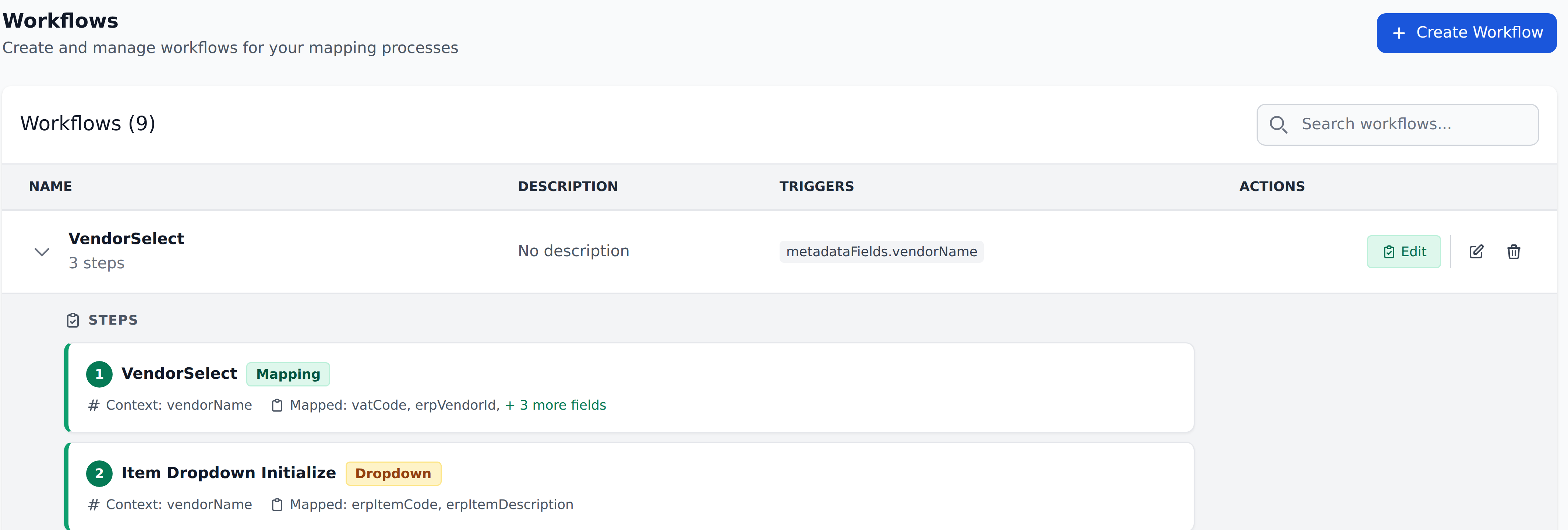
Settings → Mapping → Workflows. The page lists every workflow in the project, with its step list expanded inline beneath it.
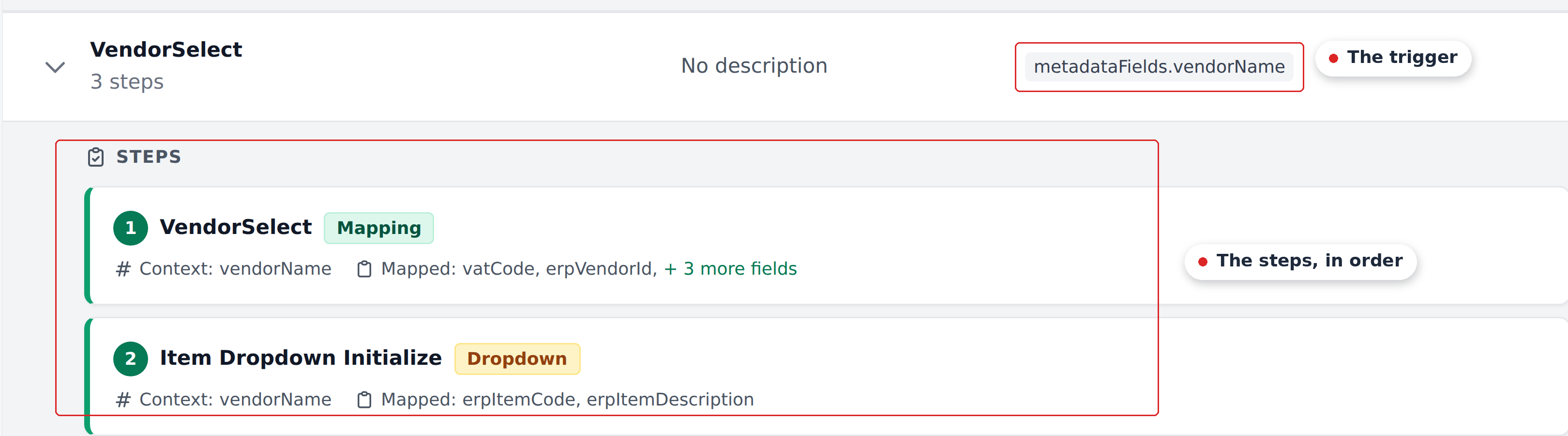
Each row carries the workflow's name and step count, a free-text description, its triggers, and Edit / Delete actions. Each step shows its type — Mapping or Dropdown — the Context columns it matches on, and the fields it writes.
That inline view is the fastest way to answer "which rule set this field?" A mature project accumulates a lot of them, so being able to read the whole chain without opening anything matters.
The two trigger types
| Trigger | Fires when | Workflow that uses it |
|---|---|---|
| Document Analysed | The engine finishes extraction | The Initial_Workflow only — every project has exactly one |
| On field select | A specific field's value changes | Every other workflow you create |
Plus a hidden internal trigger for the system-shipped Approvers workflow (not part of the self-serve product today — talk to your account manager).
See Triggers for the full treatment.
The sequential feed-through
Steps execute in declared order. Each step's writes are visible to subsequent steps in the same workflow run.
This is how composite lookups work: step 1 sets vendorAccount, step 2 uses vendorAccount as part of its Context lookup, step 3 uses both the trigger field and step 1's writes for further granularity.
See Steps and ordering for the full treatment.
Workflows don't trigger other workflows
A step writing to a Select-type field updates the field's value but does not fire the workflow watching it. Only user actions on the trigger field fire user-driven workflows.
This is the single most consequential rule for designing workflows. To chain logic, you put all related definitions as steps in one workflow, not split across workflows expecting one to chain into the next.
See Cascade rules for the full treatment.
The Initial Workflow contract
Every project has exactly one workflow named Initial_Workflow. It fires on the Document Analysed event — when extraction finishes. The trigger is implicit (not customer-configurable) and bound via Recognito's Internal Mapping integration.
Initial_Workflow's purpose: establish the post-extraction initial state. Run vendor lookups, GL coding, approver routing, dropdown initialization — everything that should happen automatically before the reviewer first opens the document.
See The Initial Workflow for the full treatment.
Sub-pages
- Triggers — Document Analysed, On field select, the hidden Approvers trigger.
- Steps and ordering — sequential execution and the feed-through rule.
- The Initial_Workflow — the one workflow per project that fires after extraction.
- Cascade rules — why workflows don't trigger other workflows, plus the design patterns this forces.
A walking example
A typical project has roughly this workflow setup:
| Workflow | Trigger | Purpose |
|---|---|---|
Initial_Workflow | Document Analysed | Vendor lookup, GL coding, approver routing, dropdown init |
Vendor Select | On field select: vendorName | Re-run lookups when reviewer changes vendor |
Department Select | On field select: department | Re-run department-specific lookups |
Total Change | On field select: Total | Re-compute approver routing if total changes |
Plus an optional Recognito-configured Approvers workflow (hidden internal trigger — not self-serve).
Reviewers see the cumulative effect of:
Initial_Workflowpopulating the document on arrival.- User-driven workflows firing as they edit specific fields.
What's next
- Triggers — what fires each workflow.
- The Initial_Workflow — the one fixed workflow every project has.
- Steps and ordering — the sequential feed-through.
- Cascade rules — the no-cross-workflow-cascade rule.
- Recipes — worked examples that span all of the above.