
Appearance
Configuring Recognito
The admin side. Set up projects, define fields, decide how documents arrive, manage users, lock down enterprise features. Most reading on the docs site happens in this section.
Most of the work an admin does happens once at project setup, then occasionally as the team grows or the business changes. The sub-sections below cover each area in depth.
Almost all of it lives behind the Settings icon in the left rail, and almost all of it is scoped to the project you were last in.
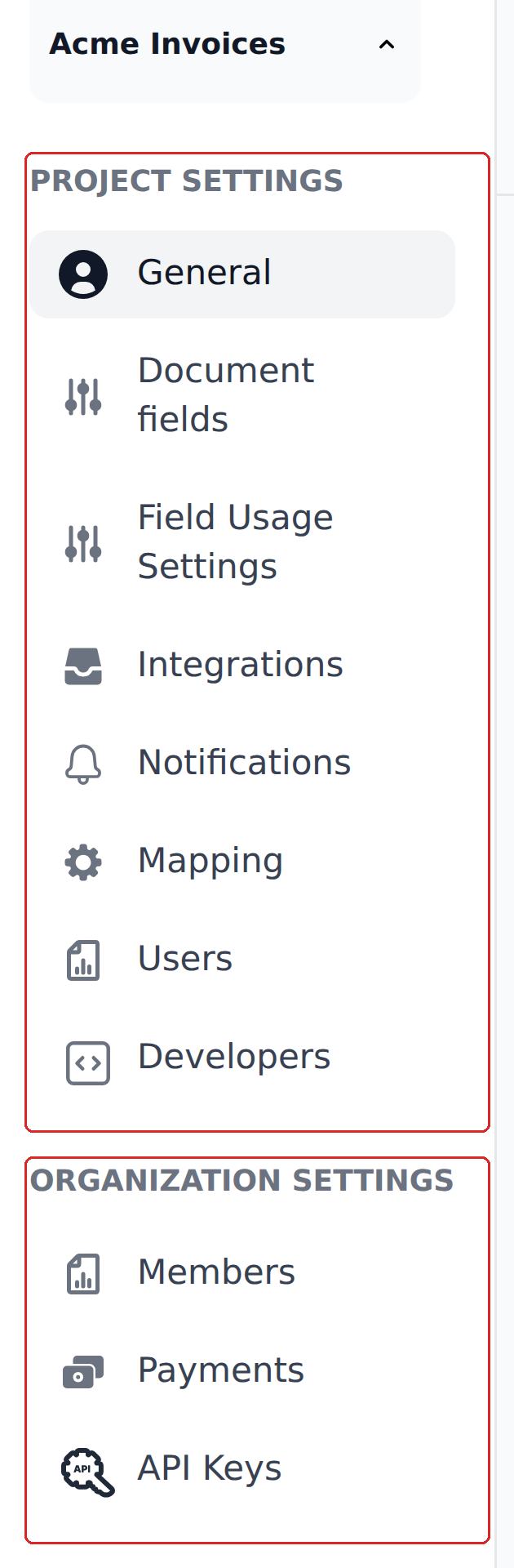
The upper block changes when you switch project. The lower block — Members, Payments, API Keys — is shared across every project in the organization.
Where to start
If you're spinning up a new project, walk these in order:
- Projects & organizations — the scoping model. Read this first; everything else depends on it.
- Document types — pick the right project type (Invoice, Receipt, Handover & Acceptance Certificate, or custom).
- Fields — what the engine extracts and how categories work.
- General settings — auto-scan thresholds, duplicate detection, document lock.
- Capture channels — how documents come in.
- Users & permissions — who can do what.
- Mapping & Workflows — the rule engine that does most of the post-extraction work.
- Integrations — how data leaves Recognito.
If you're maintaining an existing project, jump directly to the sub-section that matches your task.
What's in this section
Setting the scope
- Projects & organizations — projects vs orgs, what's scoped where.
- Document types — Invoice, Receipt, Handover & Acceptance Certificate, custom.
Fields
- Field categories — Main, Table, Payment, Tax, Metadata. Conventions vs architecture.
- Main fields — primary fields like invoice number, total, dates.
- Table fields — line items and the line-item-specific tooling.
- Payment, Tax, Metadata — the other three categories.
- Validation rules — mandatory fields and what
—Not set—blocks.
Capture channels
- Email inbox — the project mailbox, classifier, attachment handling.
- Upload — drag-and-drop, batch limits, file format support.
- API ingest — programmatic uploads.
People and permissions
- Users & permissions — visibility scopes (Personal vs Global), action permissions (Default vs Override), roles.
Other project settings
- General settings — auto-scan page threshold, duplicate detection, document lock, classify uploaded files.
- Audit & history — what gets tracked per project and across the org.
Enterprise & admin
- Enterprise & admin overview — the admin-focused corner of Configuring.
- Single sign-on — sign in with Google Workspace or Microsoft.
- Access control — the visibility, actions, and role model.
Some features require a conversation with your account manager
Some features in this section — such as SSO, on-prem deployment, and advanced access controls — are not part of the standard self-serve plans. Talk to your account manager if you need a feature that isn't available in your current setup.
What's not in this section
- Daily reviewer work — Using Recognito covers the assignee and approver flows.
- The Mapping rule engine — Mapping & Workflows gets its own top-level section because it's substantial enough to deserve one.
- Outbound integrations — Integrations covers webhooks, Make.com, n8n, ERP connectors, and cloud storage.
- API endpoints and webhooks — API Reference is the developer-facing reference.
What's next
- Projects & organizations — start here if you're new to the admin side.
- Mapping & Workflows — the rule engine; the densest area you'll configure.
- Integrations — outbound channels.