
Appearance
The daily flow
Reviewers spend most of their time in two screens: the Documents view (the queue) and Studio (the document detail). This page is the orientation. The sub-sections that follow cover each piece in depth.
Recognito assumes you have documents to review every day. The product is built around that rhythm: open the app, find what needs you, fix what needs fixing, sign off, move on.
The shape of a typical morning
- Sign in. You land on the Dashboard, which lists every project in your current organization.
- Open the project you work on. The Documents view appears — a table of every document in the project.
- Filter to your queue. Switch to the My tasks filter. The table now shows only documents that need your input right now: things waiting for your validation, and things waiting for your approval.
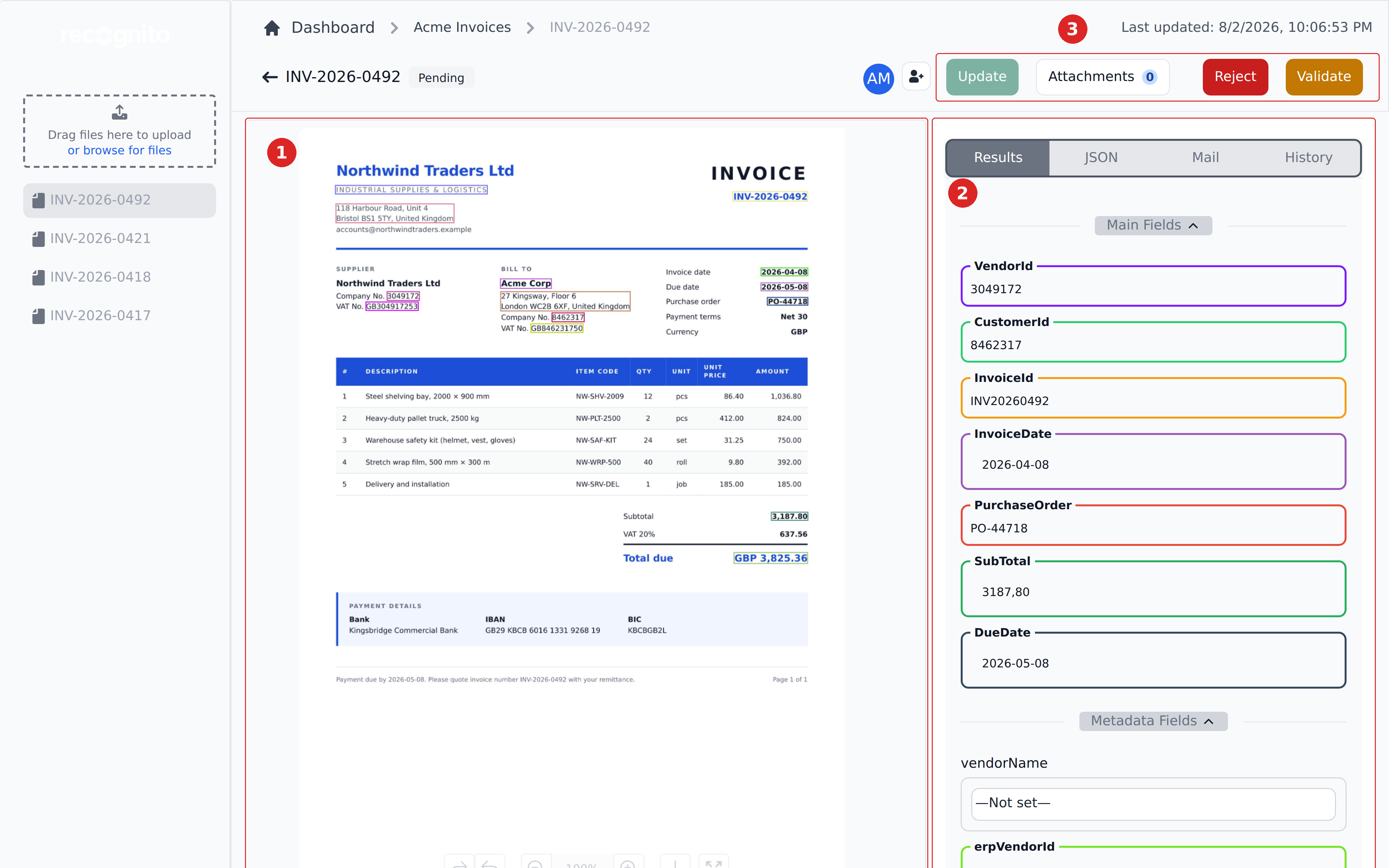
- Open a document. Click any row to open Studio — the three-pane single-document view.
- Verify the fields. Read each field, confirm the values, fix anything wrong. Most pages take a minute or two.
- Fill in non-extractable data. Some fields — department, GL code, cost center — start as
—Not set—. Pick the right values from the dropdowns. - Validate. Click Validate. The document leaves your queue.
- Repeat. A typical morning is a few dozen documents. By mid-morning, your queue is empty.
Two patterns recur: My tasks scopes you to what needs you, and Studio's layout becomes the screen you spend most of your time in.
The two main screens
Documents view
The project-scoped list of every document. You filter, search, and click into individual documents from here.

Everything above the table is a way of narrowing what's below it. The whole left-to-right flow — what statuses mean, how filters compose, how saved views work — gets its own sub-section.
- Finding & filtering — search, custom filters, the My tasks scope.
- Statuses & what they mean — the two status tracks and what each value tells you.
- Bulk actions — export, merge, mark as exported, delete.
- Saved views — saving filter + column configurations to switch contexts quickly.
Studio view
Single-document deep view: the document preview with its bounding boxes on the left, the extracted fields on the right, the line-items table below, and the actions in the top bar. This is where validation actually happens.
- Reviewing extracted fields — how to read what the engine produced.
- Correcting values & line items — edits, line-item math, find-and-replace.
- Approving / rejecting — the sign-off step and the rejection paths.
- Comments & history — the per-document audit trail.
Other things you might do
- Notifications — what Recognito tells you and when, plus how to tune it.
- Exporting & sharing — when you need to pull data out manually rather than waiting for an automated export.
- Troubleshooting — common stuck states and how to unstick them.
What this section is not
This section is for daily reviewers. Setting up projects, configuring fields, writing mapping rules, inviting users — that's all admin work, covered under Configuring Recognito. API integration is under API Reference.
What's next
- Finding & filtering — start here if you're new to the queue.
- Reviewing extracted fields — start here if you already know your way around the queue.
- How Recognito works — the five-minute mental model behind everything you'll see.