
Appearance
Cascade behavior
Workflows execute their steps in declared order. Each step's writes are visible to subsequent steps within the same workflow run. Workflows do not trigger other workflows — only their own configured trigger fires them.
Cascade is the most consequential rule for designing workflows. Misunderstanding it produces broken cascades that look mysteriously stuck.
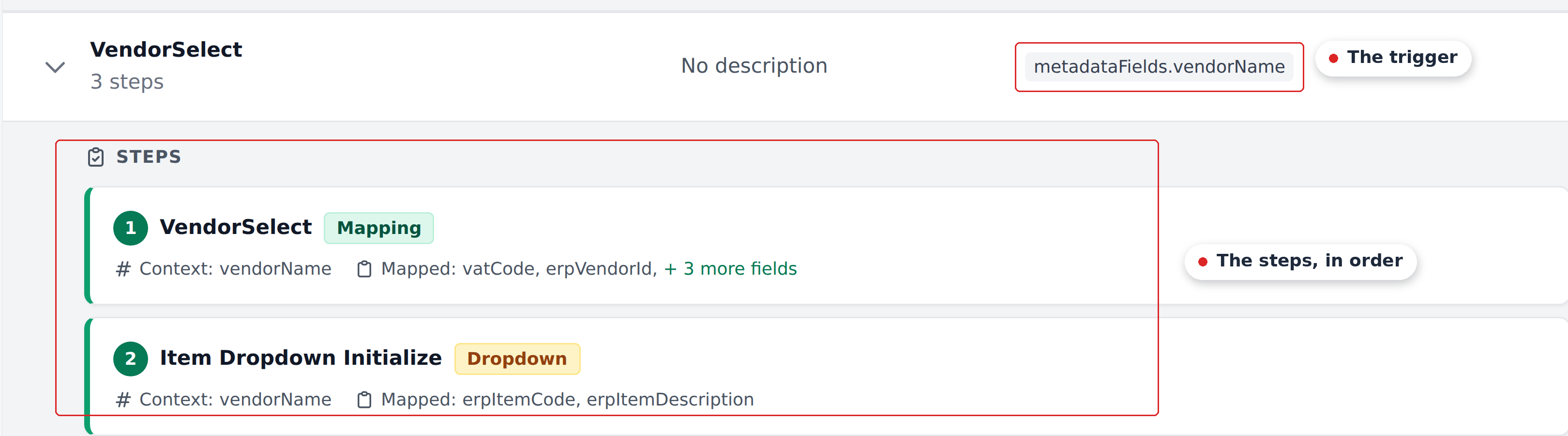
The numbers on the steps are the execution order, and they're also the reading order for working out what each step can see.
The cascade rules
Steps run in declared order
A workflow's steps are an ordered list. When the workflow fires, the steps run from first to last. Reordering steps in the editor changes execution order on the next run.
Sequential feed-through
Each step writes to document fields. Subsequent steps in the same workflow see those writes.
Example: a workflow's step 1 sets vendorAccount based on a vendor lookup. Step 2's Context references vendorAccount. When step 2 runs, it sees the newly-written vendorAccount from step 1, not whatever was there before.
This is how composite lookups across multiple definitions work. Step 1 establishes some context; step 2 uses that context for a more specific lookup.
Workflows don't trigger other workflows
A step that writes to a Select-type field updates that field's value but does not fire the workflow watching it.
Concrete: if you have a Vendor Select workflow with a step that writes itemDescription, and a separate Header Product Select workflow whose trigger is metadataFields.itemDescription, picking a vendor doesn't chain into Header Product Select. The trigger is reserved for user actions — a reviewer picking a value in Studio — not programmatic writes from another workflow.
No cross-workflow cascade
This is the single most common source of "the cascade didn't fire" confusion. To get a cross-workflow cascade effect, you don't chain workflows. You inline all the relevant definitions as steps in one workflow.
How customers compose around this
Two patterns recur:
The all-in-one workflow
A user-driven workflow includes every effect picking that field should produce — even effects that "feel like" they should belong to other workflows.
Example: a Vendor Select workflow watches vendorName. Its steps include:
- The vendor lookup itself (sets
vendorAccount,currency,VendorId). - Header Products initialization (sets
itemDescriptiondropdown and value). - Accountant and warehouse lookup (sets
accountant,warehouse). - Item Products dropdown initialization (per-line-item).
- Item Products mapping (per-line-item).
Five steps in one workflow. If the customer had instead expected a separate Header Product Select workflow to chain off step 2's write, they'd end up with a half-populated document because that chain doesn't happen.
Mirroring the Initial Workflow
User-driven workflows often re-run a subset of Initial_Workflow's steps when their trigger field changes.
If Customer Initials Select fires (because the reviewer changed customerInitials), it typically re-runs Approvers, Initialize Products, Header Product Select, and Item Product mapping — all the chunks of Initial_Workflow that depend on customerInitials. The customer picks the subset of steps that need re-running and inlines them in the user-driven workflow.
The order-matters trap
Steps in a workflow are sensitive to ordering because of sequential feed-through. Reordering steps without thinking about Context dependencies produces silent breakage:
- Earlier steps may silently no-op (their Context wasn't yet established by an even-earlier step).
- Later steps may use stale values (a step that should have run after the trigger update ran before it).
The defensive approach: when adding a step, place it after every step it depends on for Context values. When the dependency chain is long, sketch the dependencies before reordering.
The dead-workflow trap
The Workflows page shows No triggers for two different things:
- The
Initial_Workflow(whose Document Analysed trigger is implicit and not customer-visible). - Workflows the customer created without configuring a trigger field.
The UI does not distinguish them, and an assignee-change workflow can also show No triggers. Check the bindings below before treating a workflow as unused.
What about the Approvers workflow?
Recognito administrators can select a workflow to run when the assignee changes. It is often named Approvers, but the configured name can differ. The binding lives in Recognito-managed project settings, separate from customer-facing Mapping triggers.
Creating an Approvers entity or workflow alone does not enable the binding. Check with Recognito support before deleting an unfamiliar workflow with No triggers, regardless of its name.
Cascade and the empty-cell rule
When a step in a cascade writes nothing (because the matched entity row has an empty cell), the document field keeps its old value. The next step sees that old value, not nothing.
This is sometimes intentional: a workflow's step might intentionally leave fields unwritten if the entity row doesn't have updates for them. The next step then operates on the unchanged context.
For more detail, see The empty-cell rule.
Cascade and silent no-ops
If a Mapping lookup finds no matching row and has no applicable fallback or default row, its mapped fields stay unchanged. The next step in the cascade runs with that state.
This is the most common reason cascades "don't do anything visible." The cascade ran; the step just had no row to match. Add the missing row to the entity, configure a Fallback, or widen the Context.
What's next
- Async settling — when the UI shows the cascade's results.
- The empty-cell rule — what happens when the matched row has empty cells.
- Workflows overview — putting cascade rules into practice.
- Cascade rules — the deeper workflow-side treatment.