
Appearance
The empty-cell rule
When a matched entity row has an empty cell for a Mapped column, the corresponding document field is not overwritten. This is the single rule that lets customers populate as much as they know about each row without filling every cell of every row.
Short page. One rule, important everywhere.
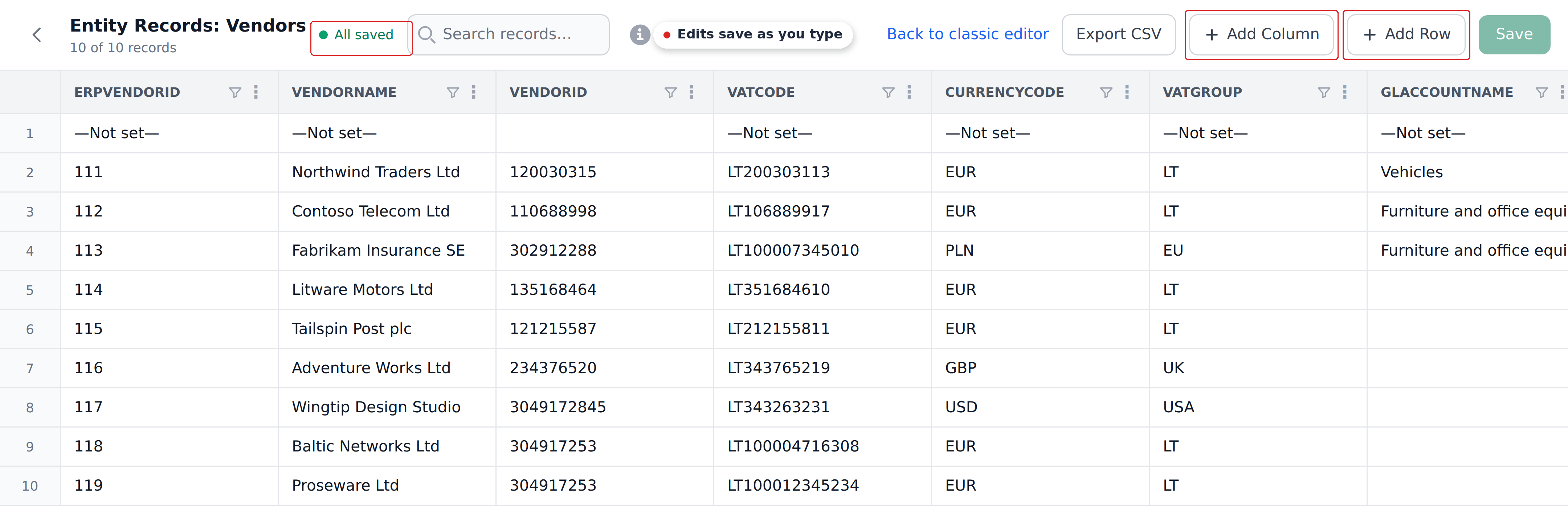
The grid above is the rule's reason for existing: only some vendors carry a GL account, and the ones that don't shouldn't blank the field on documents that already have one.
The rule
For a matched entity row:
- Non-empty cells in Mapped columns write to their target document fields, replacing whatever was there.
- Empty cells in Mapped columns are skipped. The document field keeps its existing value.
This applies to both Mapping Definitions and Dropdown Definitions. It applies to all Mapped writes — regardless of category, regardless of trigger.
Why this matters
Customers populate entities incrementally. A Vendors entity gets a row when a new vendor is added; the row has the vendor ID and name, but maybe the bank account is filled in later by accounting. The row exists, with some columns populated and others empty.
When a document hits a Mapping step that targets this row, the rule says: write what's there, leave the rest alone. The reviewer doesn't see suddenly-cleared bankAccount because the entity row's bankAccount cell happens to be empty.
This is the right default behavior. Customers can populate as much as they know per row, and the engine writes only the known parts. The alternative — empty cells overwriting with empty — would mean customers have to fill every cell of every row to avoid clobbering document data.
How it plays with the cascade
Inside a workflow's cascade, the empty-cell rule affects step-to-step feed-through:
- Step 1 matches a vendor and writes
vendorAccount=30-8412769. The matched row'scurrencycell is empty, socurrencystays unchanged. - Step 2 uses
vendorAccountin its Context. It sees30-8412769(the new value). - Step 2 also reads
currencyfor some other purpose. It sees the unchanged value (whatever was there before step 1).
The cascade combines partial writes from step to step. Step 1 didn't have to fill currency for the cascade to work — step 2 just uses whatever value currency already has.
How it plays with dropdowns
For Dropdown Definitions specifically, the empty-cell rule applies to the write portion:
- Dropdown options are rebuilt from the matching rows (empty cells are typically excluded from the option list).
- The value written to the document field follows the empty-cell rule — if the top matching row's value for the Dropdown column is empty, the document field is not overwritten.
So a dropdown step on a row with an empty Dropdown-column value rebuilds the options (excluding the empty one) but doesn't clear the document's current value.
How it plays with the no-match silent no-op
The empty-cell rule and the no-match silent no-op are different:
- Silent no-op — Context AND-match yields no row. Nothing happens at all. No writes attempted.
- Empty cell — Context AND-match yields a row, but the matched row has an empty cell for a Mapped column. The non-empty cells write; the empty cell is skipped.
A no-op is "we found no row to write from." An empty cell is "we found a row but it has nothing useful for this field." Different paths to the same observable outcome: the field doesn't update.
What this means for designing entities
When designing an entity, you don't need to fill every cell. Common patterns that work cleanly with the empty-cell rule:
- Vendor rows added with name and tax ID, bank account filled later. Writes the name immediately; bank account waits until populated.
- GL account rows with code and name; category added later. Writes the name immediately; category waits.
- Per-customer pricing overrides where most customers use the default. Override rows have the price set; the default row's price cell is empty. The override fires when matched; if no override matches, the default row's empty cell means no overwrite, and the default-priced field stays at whatever default the system set.
What this doesn't do
A few things the empty-cell rule isn't:
- Not a way to clear fields. You can't write
—Not set—ornullto a document field via an empty entity cell. The empty cell is skipped, not "written as empty." - Not a per-row choice. The rule applies to every Mapped column on every matched row. You can't say "this row should write empty cells" for an exception case.
- Not a workflow setting. It's part of the engine's core behavior.
For cases where you genuinely need to clear a document field, the path is a different definition or workflow step that writes a specific clear-marker value, not an empty entity cell.
What's next
- Cascade behavior — how the rule plays in a multi-step cascade.
- Mapped columns — where the rule shows up in definition configuration.
- Fallback records — fallback rows also obey this rule.