
Appearance
Entities overview
An entity is a customer-defined lookup table inside a project. Vendors, GL codes, departments, approvers, products — anything you want to look things up against. Entities are pure data; they don't have behavior of their own.
This page is the orientation. The sub-pages below cover creating entities, uploading records, and managing data.
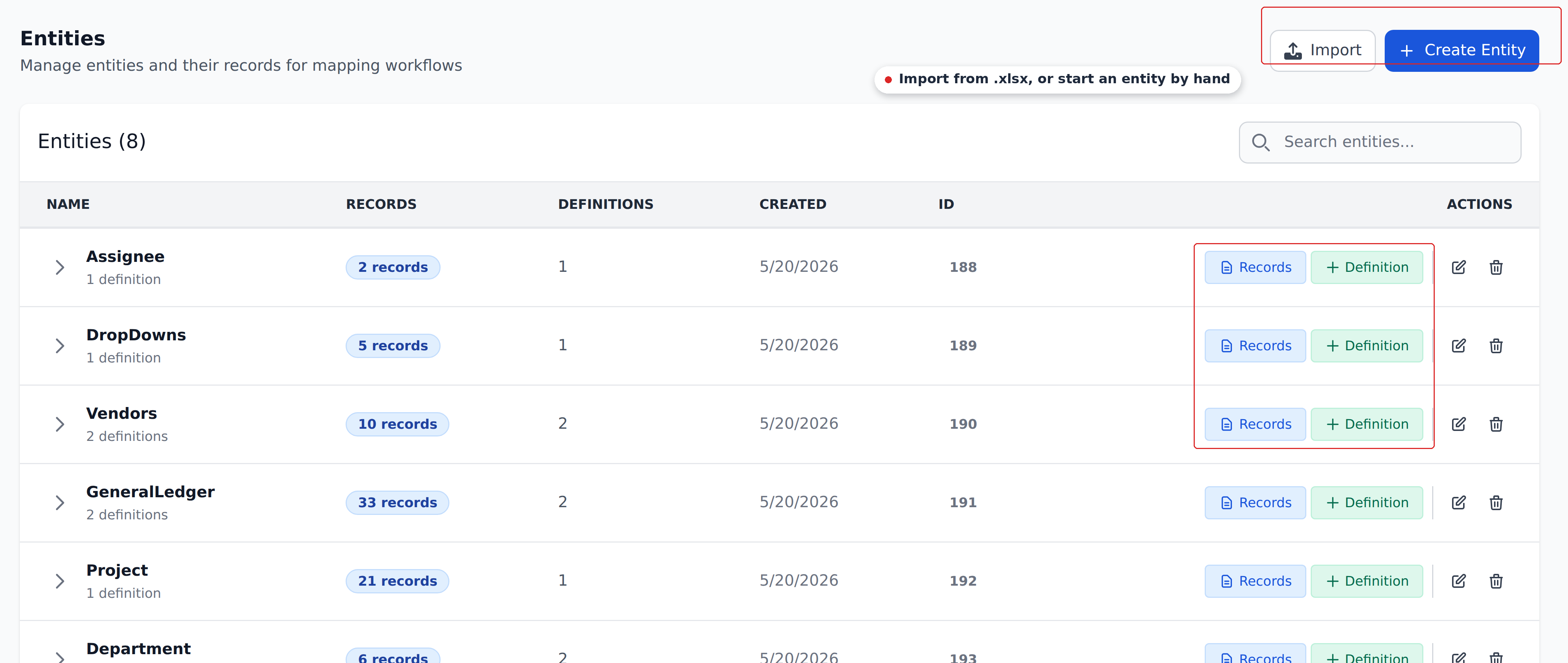
What an entity is
An entity is a table:
- A name. Free text. Examples:
Vendors,Approvers,Header Products,Customer Initials. - Columns. Free-form. Every column is text — no type enforcement. The customer decides what columns mean.
- Records (rows). Each cell can be empty. Order matters.
Entities live at the project level. Two projects in the same org don't share entities — each has its own.
Each entity gets a numeric system ID (visible in the URL when you view records, e.g., /settings/mapping/entities/200/records). The ID is mostly invisible to users.
What an entity isn't
An entity has no behavior — no validation, no triggers, no execution model. It just holds the data.
Behavior comes from definitions (lookup rules that live inside entities) and workflows (the chains that invoke definitions). An entity by itself does nothing.
Examples
Real customer entities:
- Vendors —
vendorId,vendorName,vendorAccount,taxId,bankAccount,defaultGLAccount,currency,paymentTerms. Filled with one row per vendor in the customer's master. - GL Accounts —
glCode,glName,glCategory,costCenter. The customer's chart of accounts. - Approvers —
email,name,group,slot,productionSite. Who can approve which documents. - Customer Initials —
CustomerId,customerInitials— the discriminator-pattern lookup for group-of-companies projects. - Header Products —
customerInitials,vendorAccount,itemDescription,erpItemCode,quantity,warehouse. Per-customer-per-vendor product catalog. - Item Products —
customerInitials,vendorAccount,productCode,Item_erpItemDescription,Item_erpItemCode. Per-line-item product mapping.
Each entity is shaped to the customer's specific lookup needs. There's no "right" entity model — the right shape is whatever your workflows need.
Naming conventions
Two patterns recur:
- Singular-noun-Plural for entities holding records of one type:
Vendors,Departments,Approvers. Reads naturally when used in workflows ("look up against Vendors"). - Adjective-Noun-Plural for more specific tables:
Header Products,Item Products. Distinguishes related but different shapes.
Don't worry too much about naming. Entities are renameable, and the system reads column references, not names. Pick something readable and move on.
Column conventions
Columns are free-form text. Two patterns:
- camelCase or snake_case identifiers. Match the naming you use for document fields.
vendorAccount,customerInitials,defaultGLAccount. - Descriptive labels for documentation columns. If you have columns that are only there for your team to see (a comment column, an
is_defaultflag), name them clearly.
The system doesn't read column names to infer behavior. A column called is_default doesn't get special treatment — it's just a column the customer added. Whether the system uses a column is decided by the definitions, not by the column's name.
The empty-cell rule
When a definition's lookup matches a row but a Mapped column's cell is empty, the corresponding document field is not overwritten. See The empty-cell rule for the full treatment.
The practical implication: you don't have to fill every cell of every row. Populate what you know; the engine handles the partial state correctly.
Record order matters
When a definition's Context AND-match yields multiple rows, the top matching row wins. "Top" means lowest row index in the entity's record table — literally the first row that satisfies the AND.
You can reorder rows freely; whichever row sits at the top wins. The convention some customers use is to place their preferred default at row 1 for each composite-key cluster, optionally tagging it with their own is_default = TRUE column for visual scanning. That tag has no system meaning — the system reads the row order, not the tag.
For Dropdown definitions, you can override the default-row pick with the Defaults tool.
Sub-pages
- Creating entities — the basic UI flow for adding a new entity.
- Bulk uploading records (xlsx) — the spreadsheet round-trip for high-volume data management.
- Managing records — adding, editing, removing rows individually.
What's next
- Creating entities — start here if you've never created one.
- Definitions overview — the lookup rules that live inside entities.
- Recipes — worked examples that use entities end-to-end.