
Appearance
Matching types
Every Context column in a definition has a Matching Type. Five options, applied independently per column, combined with pure AND across the definition. This is how range routing, conditional logic, and composite lookups all work.
There are no comparison operators inside column values, no IF statements, no boolean expressions. Conditionality is expressed entirely through Matching Type composition.
The Matching Type sits on the Context field in the definition builder, next to the document field it compares against.
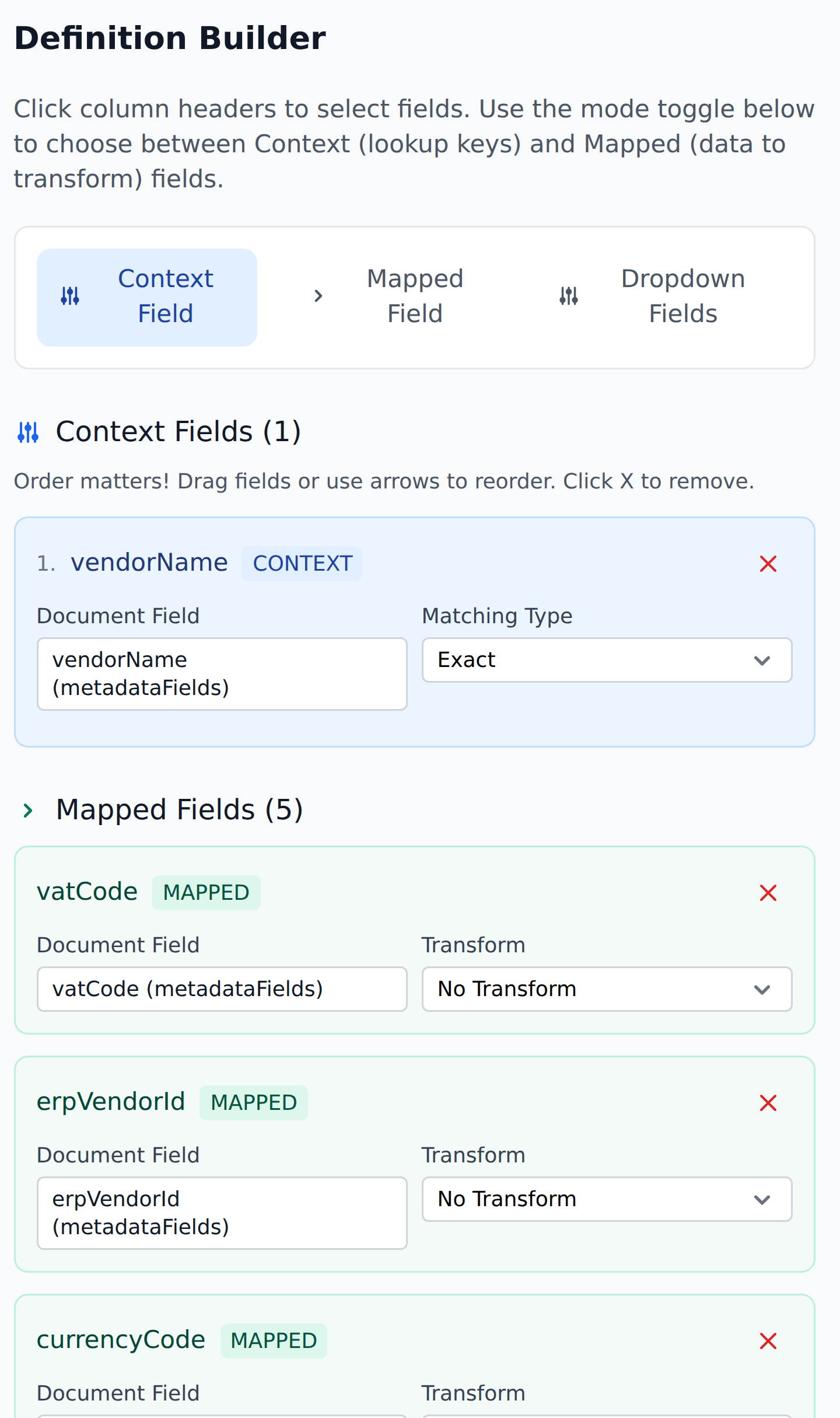
The five matching types
| Matching Type | Meaning |
|---|---|
| Exact | The document field's value equals the entity column's value (string compare). |
| Less Than | The document field's value is less than the entity column's value. |
| Less Than or Equal | The document field's value is less than or equal to the entity column's value. |
| More Than | The document field's value is greater than the entity column's value. |
| More Than or Equal | The document field's value is greater than or equal to the entity column's value. |
Each Context column gets its own Matching Type. A row matches the definition's lookup only if every Context column's comparison succeeds — pure AND.
Exact matching
The most common Matching Type. Used whenever the lookup is "find the row where this column equals that value."
Example: VendorId Exact against the Vendors entity. The document's VendorId=602362342 matches the entity row whose VendorId column is exactly 602362342. One row matches; its other columns push values back to the document.
Exact is a string compare — "100" and "100 " (with a trailing space) don't match. If you're seeing missed matches and the values look right, check for whitespace.
Range matching
The four numeric matching types — Less Than, Less Than or Equal, More Than, More Than or Equal — are how range routing works.
Example: an approver-routing definition has two Context columns:
SubTotalFromwith Matching Type More Than or EqualSubTotalTowith Matching Type Less Than or Equal
Combined with an entity whose rows look like:
| SubTotalFrom | SubTotalTo | approvers_1_1 | approvers_2_1 |
|---|---|---|---|
| -99999999 | 500 | manager@acmecorp.com | |
| 500 | 10000 | director@acmecorp.com | |
| 10000 | 999999999 | vp@acmecorp.com | ceo@acmecorp.com |
A document with SubTotal=247.15 finds row 1 (because 247.15 ≥ -99999999 AND 247.15 ≤ 500). The matched row's approvers_* columns push the approver list to the document.
This is how range routing gets expressed: by composing Matching Types on Context columns, not by encoding ranges inside column values.
Reading the operators
The verbal phrasing is from the document's perspective: "Less Than" means "the document's value is less than the entity's value." Or equivalently, "the entity's value is greater than the document's value."
For range routing, the trick is to give every row a From (lower bound, matched as More Than or Equal) and a To (upper bound, matched as Less Than or Equal). The first column says "the document's value is at or above this row's lower bound"; the second says "the document's value is at or below this row's upper bound."
Composite matching
Multiple Context columns combine as pure AND. Every column's comparison must succeed for a row to match.
Example: a Header Products lookup with three Context columns:
customerInitialswith Matching Type ExactvendorAccountwith Matching Type ExactItem_erpItemDescriptionwith Matching Type Exact
A row matches only when all three of the document's current values exactly match the entity row's columns. Adding more Context columns narrows the lookup — fewer rows will match the increased specificity.
This is the typical pattern for granular lookups: start with broad context (customerInitials, vendorAccount) for cross-customer/cross-vendor lookups, then add a third column for per-item granularity.
Mixed matching
You can mix Exact and Range matching across Context columns:
customerInitialsExactcreditLimitMore Than (the document's value is more than the entity row'screditLimit)
The first column narrows to a specific customer; the second narrows to rows whose credit limit is below the document's value. Composite AND across both.
What there isn't
A few things that aren't in the engine and aren't planned for the near-term:
- Equality with type coercion.
"100"(string) and100(number) don't match via Exact. Keep your data types consistent. - Substring match. No "starts with" or "contains" Matching Types.
- Pattern match. No regex.
- Not-equal. No "Exact NOT" or "Different From" Matching Type.
- OR within a single column. A Context column matches one value at a time; you can't say "match A or B."
For any of these needs, the typical workaround is multiple sequential rules in a workflow, each with different Context configurations.
Picking matching types
The decision tree:
- Looking up a row by an identifier? Exact. (Vendor by
VendorId, GL account byglCode, customer bycustomerNumber.) - Routing by a numeric range? More Than or Equal on the lower-bound column, Less Than or Equal on the upper-bound column.
- Narrowing within a context? Composite Exact on the discriminator columns plus whatever Matching Type fits the inner column.
If you find yourself wanting an operator that doesn't exist, the answer is almost always "split into multiple sequential rules in the workflow."
What's next
- Cascade behavior — how writes flow inside a workflow.
- The empty-cell rule — what happens when a matched row has empty cells.
- Context columns — how Matching Types attach to definitions.