
Appearance
Audit & history
Every document carries a History tab that records state changes, field edits, and approver actions. There's no cross-document or org-wide audit log in the product today — for that, the pattern is a webhook feeding your own audit system, or a conversation with your account manager.
This page covers what audit data is captured at each level and how to use it.
Per-document History (every project)
Every document has a History tab in Studio listing events in chronological order. The tab is read-only — Recognito captures events as they happen, you can't edit or delete entries.
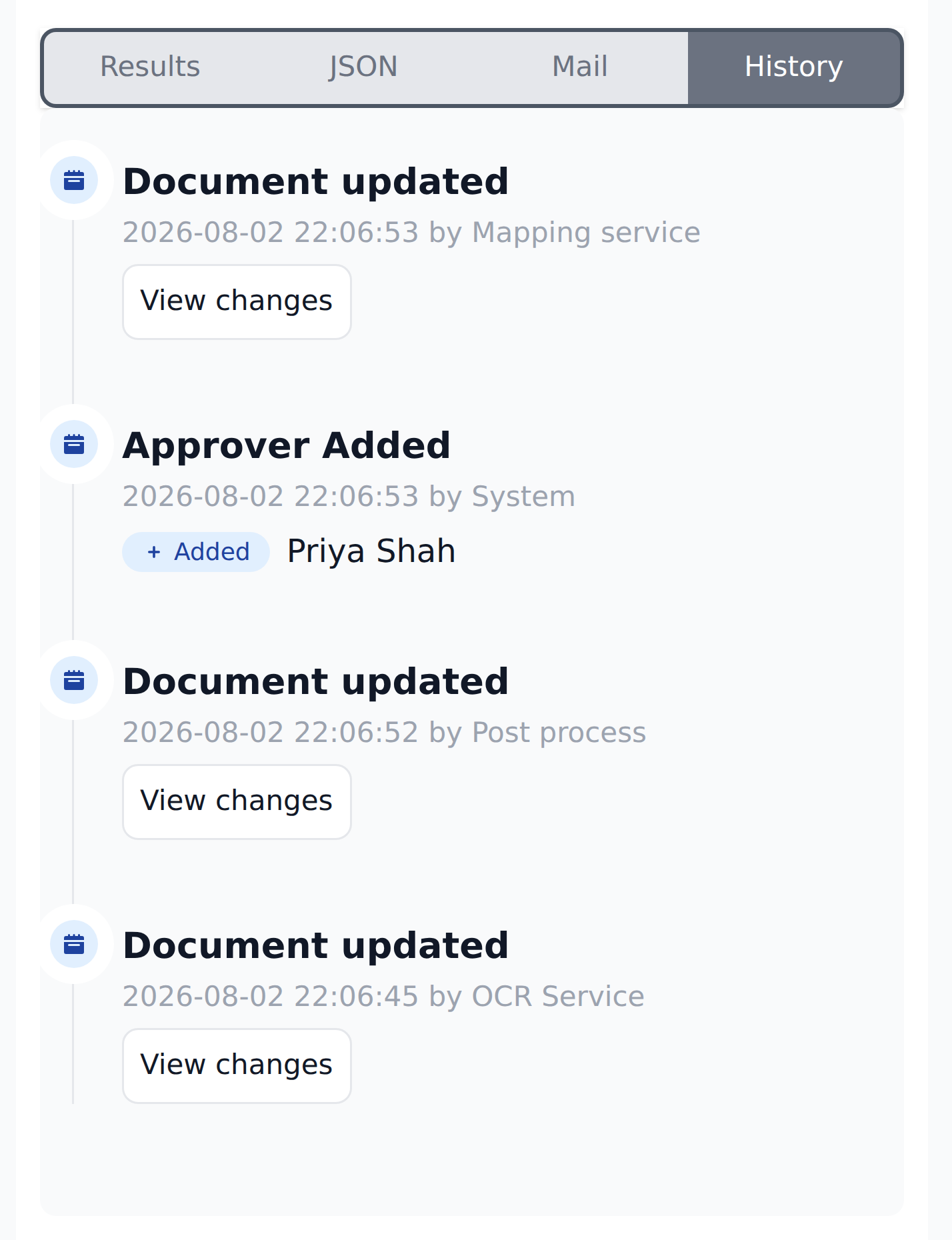
Actors are as often system components as people: the OCR service writing initial values, post-processing, a Mapping workflow filling derived fields, the system adding an approver.
Each event records:
- Timestamp — when it happened.
- Actor — the user or system component that caused it.
- What changed — a short description.
For the reviewer-facing guide, see Comments & history.
Event types you'll see
The events observed today include:
- Document updated — a field value changed (extraction, Mapping, or a manual edit). Each one carries a View changes link that opens a diff of what changed.
- Approver Added / Removed — an approver was assigned to or removed from the document.
Every entry shows the actor and a timestamp. Recognito hasn't published the full list of tracked event types, and it grows as the product adds more — so treat the above as the events you can rely on, not an exhaustive catalogue.
When to consult History
Common admin uses:
- Investigating a stuck document. Why didn't approvers fire? Why is this still Pending? History shows what actions have actually happened.
- Disputed audits. "Did Alex sign off on this?" — History has the answer with timestamps.
- Debugging Mapping. A field shows the wrong value; History tells you whether it came from extraction, a workflow, or a manual edit.
Project-level audit (limited today)
Recognito doesn't currently surface a project-wide audit log in the standard UI. There's no "show every action across every document in this project" view.
The available approximations:
- Documents view filters. Filter to documents that changed recently, then click into each to see History.
- The History tab on each document. The canonical source for that document's events.
- Webhook events. If your project has webhooks configured, every fired webhook is an audit trail of its own — your receiver's logs become the audit log.
For broader audit needs, see the organization-level section below.
Organization-level audit
Recognito doesn't have an org-wide or cross-project audit log in the product today. There's no built-in view that answers "what did this user do this week across every project" or "who changed the Mapping rules last month."
The practical substitute is a webhook (Settings → Integrations): point it at your own SIEM, data warehouse, or audit table, and your receiver becomes the cross-document log. That covers document-state events; it doesn't cover configuration changes (Mapping edits, permission changes), which aren't surfaced via webhooks either.
For a true org-wide audit trail, the webhook feeding your own SIEM or audit table is the supported pattern today.
What History does not record
A few categories of action that aren't (or aren't fully) in the audit trail today:
- Configuration changes — changing a Mapping rule, editing field schema, modifying user permissions. The change happens but isn't surfaced in a unified audit view.
- Failed actions — attempts that didn't succeed (e.g., a Validate click on a document with missing mandatory fields) don't appear.
- Read-only access — who viewed a document without editing it isn't logged.
- API calls — programmatic actions aren't broken out with per-key attribution in History today.
If any of these matter for your compliance posture, talk to your account manager.
Retention
Per-document History persists for the life of the document. Even after Exported, the trail stays in the document's record.
How long deleted documents' history persists is currently undocumented in the product UI. For specific retention requirements (GDPR right-to-erasure, regulated-industry obligations), talk to Recognito support — they can advise on contractual retention terms.
Using History for compliance
For internal review — "did this get signed off, by whom, when" — per-document History is usually enough.
For audit-grade requirements (SOX, GDPR, industry rules), the practical pattern today is:
- Per-document History as the per-document record.
- A webhook that records every document-state event (Analysed / Validated / Approved) into your SIEM or audit table.
- Your own periodic snapshot for cold-storage retention.
This covers document-lifecycle events. Configuration-change auditing — who edited Mapping or permissions — isn't surfaced today; if you need it, talk to your account manager.
What's next
- Comments & history — the reviewer-facing History guide.
- Webhooks — pushing events to your own audit system in real time.