
Appearance
Webhooks
The most flexible outbound integration. Fire an HTTP POST to your endpoint when documents reach configurable states. Recognito recommends HTTPS. Real-time, configurable per project, with built-in retry on failure.
This page is the operational view — when webhooks fire, how to configure them, and what to expect. For the developer-side reference (exact payload shape, headers, code samples), see the API webhook guide.
What a webhook is
A webhook is an HTTP POST that Recognito sends to your endpoint when something happens. Recognito recommends an HTTPS URL. The payload contains the document's data (shaped by your Custom Response Schema, if configured).
You configure the URL, one trigger event, and whether the source file rides along. Once saved, every occurrence of that event fires a POST.
Where to configure
Settings → Integrations, then the Webhook Integration card. There's exactly one card, and no affordance for adding a second — one webhook configuration per project.
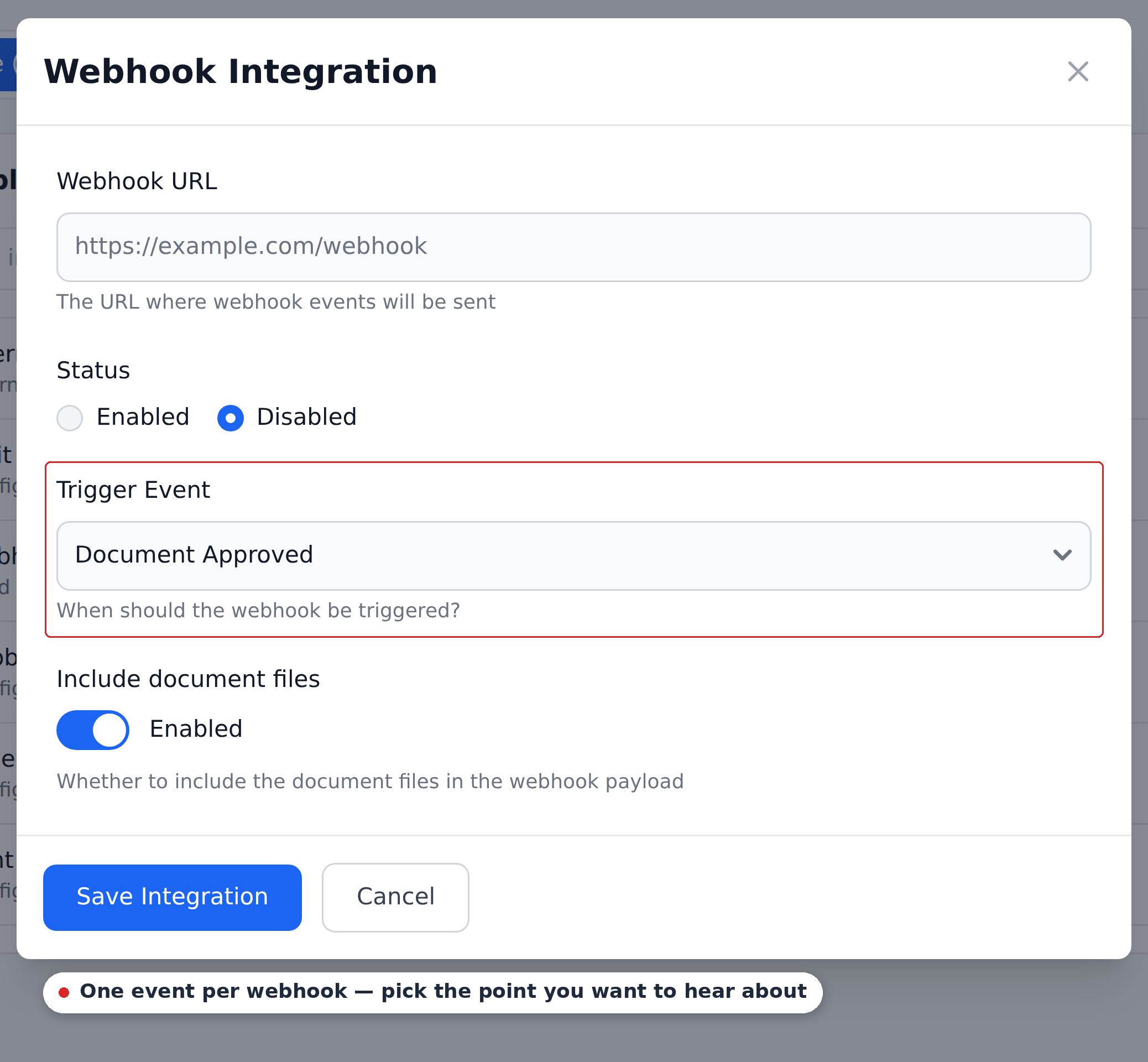
- Webhook URL — where to POST. Recognito recommends HTTPS.
- Status — Enabled or Disabled, so you can stage a webhook before it starts firing.
- Trigger Event — one event, chosen from a dropdown.
- Include document files — whether the source file rides along in the payload.
One webhook, one event
The Trigger Event control is a single-select, and a project has a single webhook. So a project pushes to one URL, on one event. If you need more than that — two destinations, or two events — put a low-code orchestrator (Make.com or n8n) at the receiving end and fan out from there.
Trigger events
Three events are available in the dropdown:
| Event | Fires when |
|---|---|
| Document Analysed | Extraction and Initial_Workflow complete. Document Status flips to Done. |
| Document Validated | An assignee marks the document Validated. |
| Document Approved | All required approvers have signed off. Approval Status is Approved. |
Most customers pick Document Approved — fire after final sign-off, push to the ERP, done. Choose Document Analysed instead when your receiver wants the raw extraction as early as possible, and Document Validated when the interesting moment is a human confirming the data rather than the approval chain finishing.
Payload shape
The payload is multipart form data containing:
- The structured document JSON in a form field. Shape governed by your Custom Response Schema (Settings → Developers).
- The source file (PDF or image) in another form field, if "include files" is on.
The schema is built under Settings → Developers, where the page is headed Custom API & Webhook Schema builder — the same schema shapes both the webhook body and the Custom Get API response, so you configure it once.
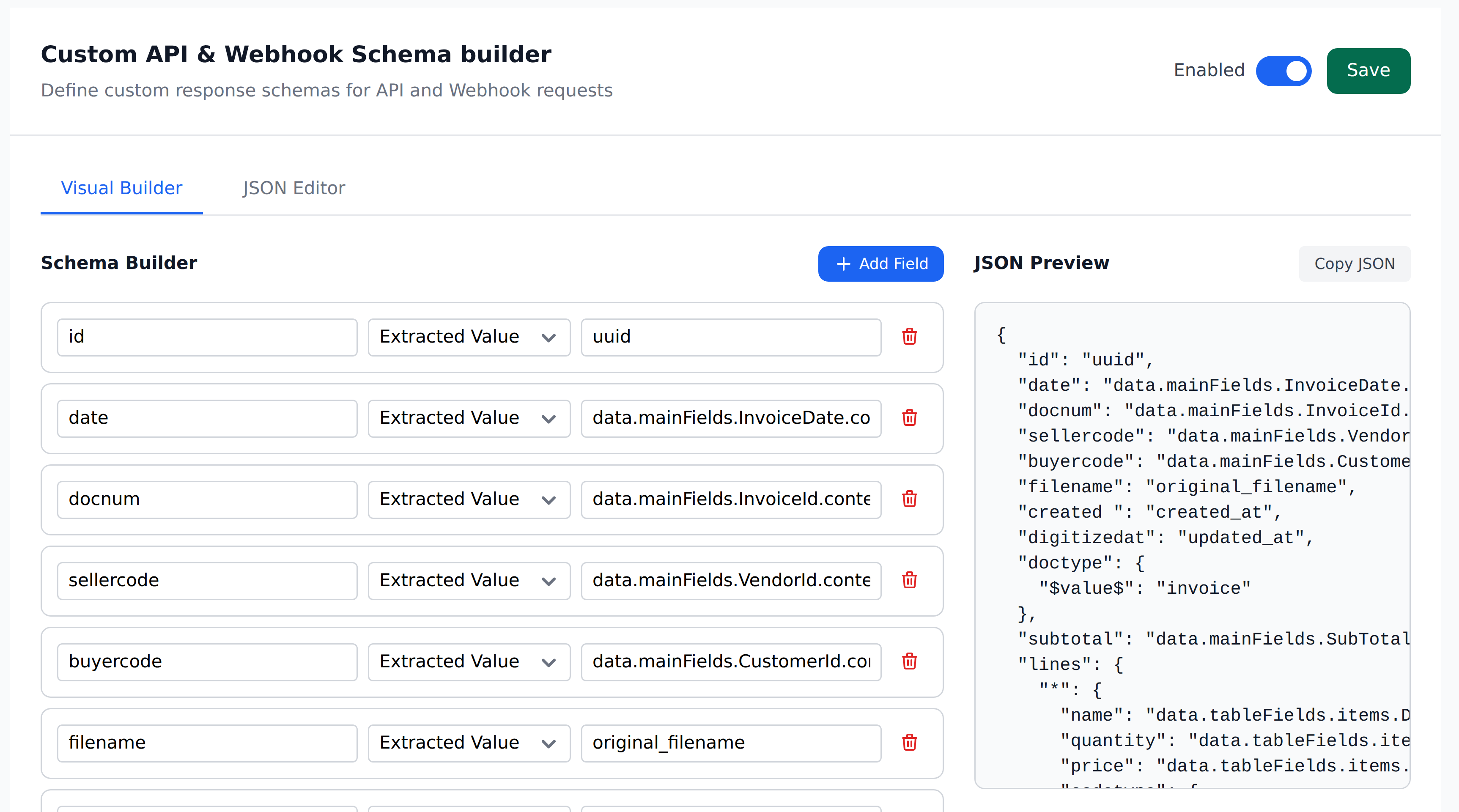
Each row names an output key and where its value comes from. The JSON Preview on the right updates as you edit, so you can see the exact shape your receiver will get before you save. The JSON Editor tab is the same schema as raw text, if you'd rather paste one in.
For the full payload reference, headers, and code samples for receiving the webhook, see the API webhook guide. It covers the exact JSON structure, file handling, and verification recommendations.
Retry behavior
If your endpoint doesn't respond with a 2xx within 30 seconds (or responds with a non-2xx), Recognito retries:
- First retry: 1 minute after the initial attempt.
- Second retry: 5 minutes after the first retry.
- Third retry: 10 minutes after the second retry.
- After three failed attempts: the webhook is marked failed.
There's no built-in "replay failed deliveries" affordance today. Once marked failed, the delivery doesn't re-fire automatically. If you need replay, the path is to capture the document via API and process it yourself.
Plan your endpoint for the retry behavior:
- Make your endpoint idempotent. Receiving the same payload twice (because of a retry on transient failure) should produce the same end state.
- Acknowledge fast. Respond with 2xx within the 30-second window. Defer slow processing to a background worker.
- Monitor failed webhooks. Set up alerting if a webhook starts marking deliveries failed — you may have an outage or a bug.
Verification
There's no HMAC signing on Recognito webhooks today. The public docs recommend:
- Validate the source domain (the IP / hostname the POST comes from).
- Use HTTPS for the endpoint URL.
- Restrict access at the network layer if your endpoint is sensitive.
For high-security integrations, validate that the JSON payload contains an expected secret, or restrict access at the network layer.
No HMAC signing today
If your security requirements demand cryptographic verification of webhook authenticity, raise it with Recognito support. The current verification model is domain + HTTPS only; HMAC signing may be on the roadmap but isn't shipped today.
Failed delivery handling
When a webhook fails its three retries, there's no in-product view of the failed delivery. You'll typically discover it via:
- Your receiver's logs — if you're getting fewer webhooks than expected.
- Active monitoring — set up alerts on your receiver for missing deliveries.
For documents where the webhook failed, the data is still in Recognito. You can:
- Re-export manually via clipboard or print.
- Pull via API using the GET endpoints.
- Wait for the next state change if more trigger events will fire.
When to use a webhook vs alternatives
| Scenario | Use… |
|---|---|
| Single push to one system | Webhook |
| Push to multiple systems / orchestration | Make.com or n8n |
| Custom transformation before delivery | Make.com / n8n, or webhook to a transformation service |
| Pull-style integration | API + scheduled pull from your side |
| Standard ERP integration | Check the ERP connectors first |
Webhooks excel at "Recognito has new data, push it to one place." They're the fastest path to a working integration when you have a custom downstream system and a developer to write the receiver.
What's next
- API webhook guide — the developer-facing reference with payload examples.
- Make.com — for low-code orchestration on top of webhooks.
- n8n — same for n8n.
- Settings → Developers — the Custom Response Schema shapes the JSON the webhook delivers.