
Appearance
Statuses & what they mean
Every document carries two status values, each tracking a different question. Knowing which one answers which question saves a lot of confusion later.
The Documents view shows both as separate columns.
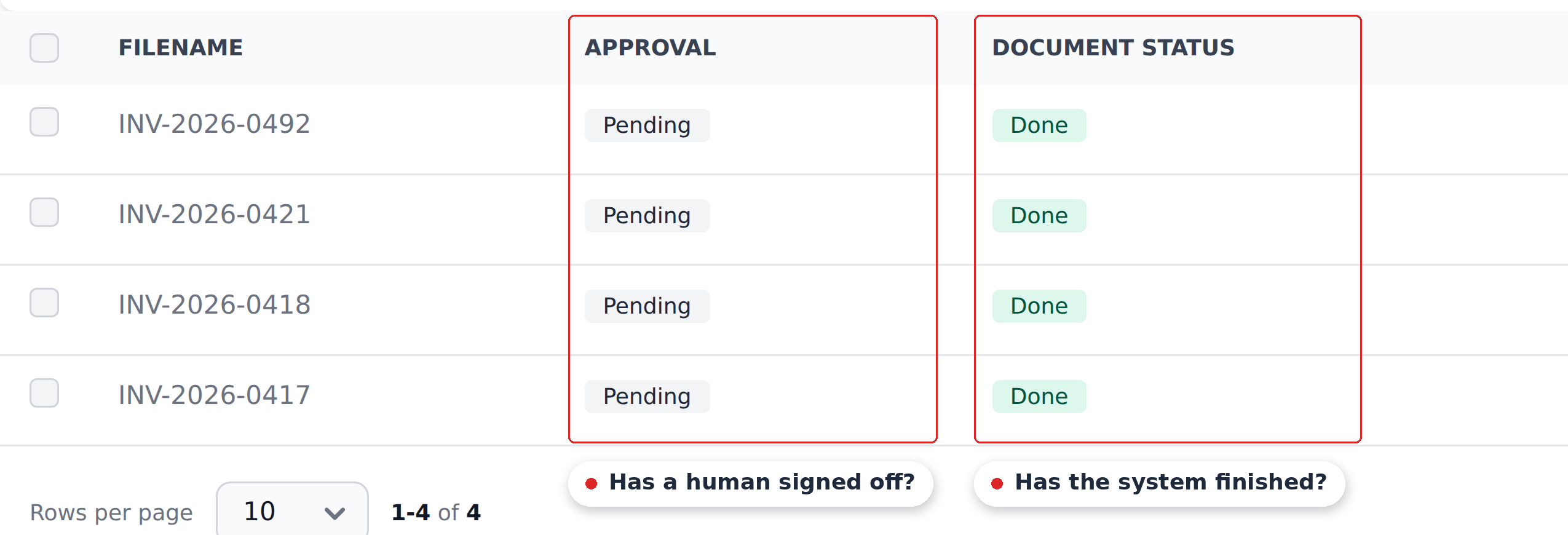
The Approval Status filter strip filters by the human-review status; the Document Status column shows the technical-pipeline status.
The two tracks
| Track | Question it answers | Values |
|---|---|---|
| Document Status | Has the system finished its work on this? | Needs action, Processing, Done, Exported |
| Approval Status | Has a human signed off on this? | Pending, Validated, Approved, Rejected, Duplicate |
They're independent. A document can be Done (extraction finished) but still Pending (no human has touched it). It can be Exported (sent to the ERP) and Approved (signed off). It can be Done and Rejected (extracted fine, but rejected on business grounds).
Document Status — the technical track
Set automatically by the system. You don't change it manually — Recognito moves the document through these states as the work proceeds.
Needs action
The file is waiting for a decision before extraction. Use the Needs action filter to find held files, then open the badge in Studio to read the reason.
A file can be held because it exceeds the page threshold, its type is not accepted, or the classifier proposed a split requiring review. Split review can be required by the project mode, low or missing confidence, no accepted parts, an incomplete proposal or a failed automatic cut.
The page threshold guards against accidentally running a 200-page PDF through OCR. Admins can set it to five pages or more, or choose Unlimited, in General settings.
Click Select pages for a page-threshold hold or Review split for a proposal. A whole file with an unaccepted type has a type selector and a processing button. See Splitting, combining and trimming documents for the review steps.
Processing
Extraction is running. OCR plus machine learning is reading the document and populating field values. This usually takes seconds to a couple of minutes depending on document complexity.
You can open a document in Processing but the fields haven't populated yet — wait for Done.
Done
Extraction finished and the project's Initial_Workflow has run. The document is ready for human review.
This is the longest-lived Document Status — documents stay Done for as long as the human-review track keeps them there. A document can be Done and Pending, Done and Validated, or Done and Approved, depending on where it is in the approval track.
Exported
The document has left Recognito — either an outbound integration delivered it, or someone manually marked it as exported.
Exported is not the same as Delivered
A document can be marked Exported manually via the bulk action Mark as Exported, even if nothing was actually pushed downstream. This exists for orgs that export out-of-band (printing for a paper archive, pasting into accounting software) and want to track which documents they've already handled.
Approval Status — the human-review track
This one moves through human action. The states track where a document sits in the review and approval pipeline.
Pending
The default Approval Status for a freshly extracted document. No human has signed off yet. The assignee opens the document, verifies the data, and either validates, rejects, or — in small orgs without separate approver groups — approves directly.
Validated
The assignee has signed off on the data. The document is ready for an approver to review.
If the project has Approver Groups configured, the document waits in Validated until the configured approvers act. If no groups are configured, the assignee can move straight to Approved.
Once you've validated a document, the Reject and Validate buttons stop appearing for you in Studio — the decision that was yours to make has been made.
Approved
The final sign-off has happened. The document is ready to leave Recognito — outbound integrations fire, the data flows to wherever you've configured it to go.
Approved documents can still have their Document Status change (to Exported) but their Approval Status stays at Approved.
Rejected
An assignee or approver decided the document shouldn't move forward — wrong data, wrong document type, business reasons. The document stays in the project for audit purposes but doesn't export.
Reversing a rejection requires the Override permission. Default users can reject but can't un-reject — they need an admin's help.
Duplicate
The system flagged this document as a duplicate of one already in the project, based on the field-value duplicate checker your admin configured (typically invoiceNumber plus vendorTaxId).
Duplicate detection is a project setting
The Reject duplicate files toggle in Settings → General controls whether byte-for-byte identical uploads are turned away at the door. With it off — the default — re-uploading the same file simply creates a second document, and both consume page quota. Field-value duplicates are the separate path: those get saved, extracted, and flagged as Duplicate here so you can inspect them.
If a Duplicate is in fact a real document (false positive on the duplicate check), the assignee can return it to Pending and validate it normally. If it's a confirmed duplicate, reject it.
The state diagram
   UPLOAD
     │
     ├──► (file-hash duplicate) → rejected at upload, never appears
     │
     ├──► (no hold needed) ──────────────────────────────┐
     │                                                  │
     ▼                                                  │
   Document Status: Needs action ──(user reviews file)───┤
                                                        ▼
                                                  Processing
                                                        │
                                                        ▼
                                                      Done
                                                        │
                                                        ▼
                                                  (assignee opens in Studio)
                                                        │
   Approval Status: Pending ──► Validated ──► Approved ──► Document Status: Exported
                       │             │
                       └─────────────┴──► Rejected
                       │
                       └──► Duplicate (field-value match detected)
The two tracks move in parallel but on different beats. The system moves the Document Status track; people move the Approval Status track.
What to do at each status
| If a document is… | The next action is… |
|---|---|
Needs action | Open its badge in Studio, read the reason, then review the split, pages or type |
Processing | Wait — the engine is still running |
Done + Pending (and you're the assignee) | Open it, verify the fields, click Validate |
Done + Validated (and you're an approver) | Open it, sign off — click Approve or Reject |
Done + Approved | Nothing — wait for export |
Done + Rejected | Investigate. If it should move forward, ask an admin to override |
Done + Duplicate | Check if it's actually a duplicate. If yes, reject. If no, return to Pending and validate normally |
Exported + anything | The work is done; this is the archived state |
What's next
- Finding & filtering documents — narrow the table to whichever statuses you care about.
- Bulk actions — what you can do to multiple documents at once.
- How Recognito works — the broader mental model that puts both status tracks in context.